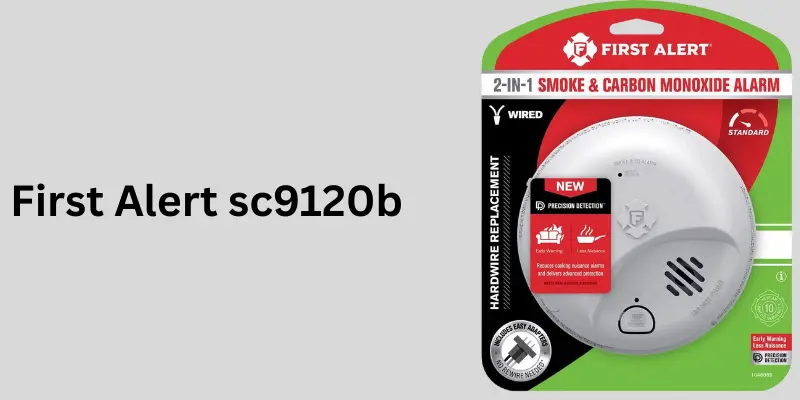
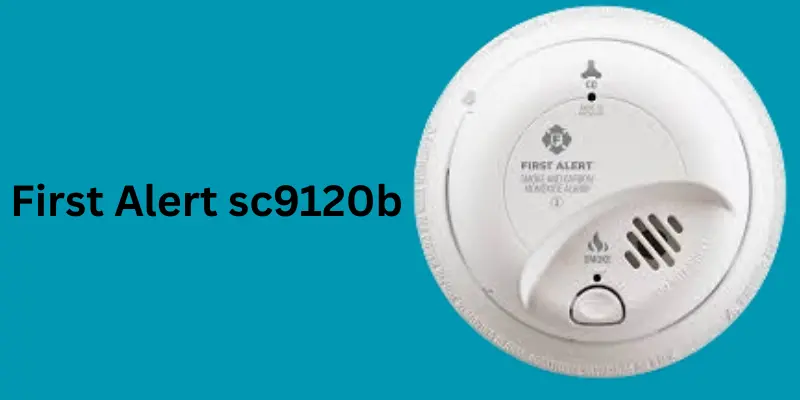
The First Alert SC9120B is one of the most trusted hardwired smoke and carbon monoxide alarms on the market. Designed for safety-conscious homeowners, it combines advanced technology with user-friendly features. Whether you’re looking to understand the First Alert SC9120B manual, troubleshoot chirping or beeping issues, or find the best replacement for First Alert SC9120B, this comprehensive guide will help.
.
Here’s table for further details
What is the First Alert SC9120B?
The First Alert Model SC9120B is a combo alarm that detects bothsmoke and carbon monoxide(CO). It comes equipped with a hardwired system with battery backup, making it reliable even during power outages. It uses an ionization smoke sensor to detect fast-flaming fires and an electrochemical CO sensor for accurate gas detection.
Types of First Alert SC9120B
The First Alert SC9120B is a specific model, but there are related versions or compatible models that fall into similar product lines. Technically, the SC9120B itself doesn’t have different “types” under the same model number, but it is part of the First Alert 9120 series. Here’s a breakdown:
1. First Alert SC9120B (Base Model)
Combo Alarm: Detects both smoke and carbon monoxide
Hardwired with battery backup (9V battery)
Ionization smoke sensing and electrochemical CO sensing
Interconnectable with up to 18 compatible alarms
2. BRK SC9120B
BRK is the parent brand of First Alert. The BRK-labeled SC9120B is technically identical to the First Alert version, just sold under a different brand label.
3. First Alert SC7010BV (Voice Alert Version)
Similar combo alarm but includes voice alerts and photoelectric smoke sensing (instead of ionization)
4. First Alert SC9120LBL
Same as SC9120B, but with a long-life lithium battery backup instead of a 9V battery
5. First Alert 9120B
Smoke-only version, no CO detection
6. First Alert CO5120BN
Carbon monoxide-only version, compatible for interconnection
Note: These related models can be interconnected with SC9120B for a complete home safety network.
Working Principle of First Alert SC9120B
The First Alert SC9120B is a dual-sensor combination alarm that uses two distinct sensing technologies to protect against smoke and carbon monoxide threats.
Smoke Detection (Ionization Sensor):
Uses a small amount of radioactive material between two electrically charged plates.
When smoke particles enter, they disrupt the ion flow, triggering the alarm.
Uses a chemical solution that reacts with carbon monoxide gas.
As CO levels increase, the sensor generates an electrical current that triggers the alarm.
Power Supply:
Hardwired (120V AC) into your home’s electrical system.
Has a 9V battery backup in case of power failure.
Interconnectivity:
Can be interconnected with up to 18 alarms (including 12 smoke/CO units).
If one alarm sounds, all connected alarms sound.
Additional Features:
Test/Silence button for manual check or muting false alarms.
LED indicator to show the alarm’s operational status.
Emits specific patterns/sounds for smoke and CO to differentiate hazards.
Importance of First Alert SC9120B
The First Alert SC9120B plays a critical role in home and commercial safety, especially where early detection of both smoke and carbon monoxide is essential.
Key Importance Points:
Dual Protection – Combines smoke and CO detection in one device.
Hardwired Safety – Constant AC power ensures reliability.
Backup Battery – Works even during power outages.
Faster Response – Ionization sensor responds quickly to flaming fires.
Advanced CO Detection – Electrochemical sensor ensures high accuracy for carbon monoxide.
Interconnect Capability – Ensures entire home is alerted to danger, not just one room.
Cost-Efficient – Combines two devices into one, saving installation and equipment cost.
UL Certified – Meets industry safety standards.
Peace of Mind – Alerts occupants even during sleep.
User-Friendly Testing – With a single test/silence button.
LED Status Indicator – Easily monitor power and alarm state.
Understanding the First Alert SC9120B user manual is essential for proper setup and maintenance. It includes:
Wiring instructions
Mounting instructions
Sound pattern meanings
Test procedures
Silencing false alarms
You can download the First Alert SC9120B manual from the official First Alert website or request a copy from your local retailer.
Installation of First Alert SC9120B
First Alert SC9120B installation is straightforward:
Mount on the ceiling or wall.
Connect to household wiring per the SC9120B wiring diagram.
Insert a backup battery.
Test using the SC9120B test button.
Note: Always turn off power before installation to prevent electrical hazards.
Troubleshooting Common Issues
1. First Alert SC9120B Beeping or Chirping
3 beeps every minute: Indicates a CO emergency.
1 chirp every 30–60 seconds: Low battery or end of life.
Silence chirping using the test and silence button, but only after addressing the cause.
2. First Alert BRK SC9120B Blinking Red Light
Blinking red every 40 seconds: Normal operation.
Steady or rapid blinking: Alarm condition or fault.
Compatibility and Replacement Options
First Alert SC9120B replacement units are available directly from First Alert, Home Depot, or online retailers.
Compatible with BRK SC9120B, First Alert BRK SC-9120B, and other interconnected First Alert models.
Look for exact model number SC9120B to ensure compatibility.
Replacement for First Alert SC9120B is usually the same model or an upgraded version like SC9120LBL.
First Alert SC9120B Not Stopping Beep Even with New Battery
If your First Alert SC9120B continues to beep even after inserting a new 9V battery, consider the following possible causes and solutions:
Possible Causes & Fixes:
Improper Battery Installation Ensure battery terminals are fully connected and the battery door is tightly closed.
Residual Memory / Alarm Reset Needed Reset the unit:
Disconnect power (AC and battery)
Press and hold Test button for 15–20 seconds
Reinstall battery and reconnect power
Alarm is End-of-Life (EOL) Check the manufacturing date on the back. If the unit is 10 years old, it must be replaced.
Dust or Insects Inside Alarm Gently vacuum or blow out any dust/insects using compressed air.
Another Interconnected Alarm Beeping If interconnected, check all alarms in the network—another unit may be the one causing the beeping.
Best Practices for Replacing First Alert SC9120B
Replacing your SC9120B ensures ongoing safety. Here’s how to do it right:
Replacement Best Practices:
Turn Off Power
Switch off the circuit breaker to prevent electrical hazards.
Remove the Old Unit
Twist the alarm counter-clockwise and unplug the wiring harness.
Check Compatibility
If replacing with the same model (SC9120B), the mounting bracket and harness may be reused.
If upgrading to a newer model (like SC9120LBL), use the new bracket and wiring harness included.
Install the New Unit
Insert Fresh 9V Battery
Always install a fresh alkaline 9V battery before powering up.
Test After Installation
Press the Test button to ensure the alarm functions correctly.
First Alert SC9120B Interconnects with Other Alarms
Yes, the SC9120B is designed to interconnect with other compatible alarms in your home.
Interconnect Details:
Interconnect Capacity:
Connects with up to 18 devices total (including 12 smoke/CO alarms + 6 accessories such as strobe lights)
Wiring:
Uses a 3-wire system:
Black = Live
White = Neutral
Orange/Red = Interconnect wire
Compatibility:
Can interconnect with other First Alert and BRK hardwired models (smoke, CO, combo alarms)
Functionality:
When one alarm detects danger, all connected alarms sound.
Ensures whole-house alert, even if the hazard is in a remote room.
First Alert SC9120B Troubleshooting Guide
Here’s a quick-reference troubleshooting guide for common SC9120B issues:
Problem
Likely Cause
Solution
Constant chirping
Low battery
Replace with fresh 9V battery
Chirping after battery change
Needs reset
Disconnect power and reset the unit
Random alarms
Dust, insects, power surges
Clean unit, check wiring, ensure proper installation
Won’t stop alarming
Detected smoke/CO or malfunction
Ventilate, silence with button, or replace if faulty
No sound during test
Faulty unit or wiring
Check power, battery, interconnect wiring
Beeping every 5 minutes
End of life warning
Check date, replace unit if over 10 years old
First Alert SC9120B Mounting Bracket Instructions
Here’s how to install or replace the SC9120B using its mounting bracket:
What You’ll Need:
Supplied mounting bracket
Screws and anchors (included)
Screwdriver
Drill (if installing on ceiling or drywall)
Installation Steps:
Choose Location:
Ceiling or high on the wall, 4–6 inches from ceiling if wall-mounted
Away from vents, fans, kitchens, or bathrooms
Attach Bracket:
Use bracket as a template to mark holes
Drill holes and install anchors if needed
Secure bracket with screws
Connect Wiring:
Plug the wiring harness into the back of the alarm
Mount Alarm:
Align the alarm with the bracket and twist clockwise until it locks
Insert Battery:
Open battery drawer, insert a fresh 9V battery, and close it
Power Up & Test:
Turn power back on at the breaker
Press Test button to ensure functionality
Note: If you’re replacing an old SC9120B, the bracket and wiring harness may already match.
Sound Patterns & Their Meaning
Pattern
Meaning
3 short beeps + pause
Smoke alarm
4 short beeps + pause
Carbon monoxide alarm
1 chirp every 60 sec
Low battery or end of life
Use the SC9120B test and silence button to verify alerts.
Lifespan of First Alert SC9120B
The First Alert SC9120B lifespan is approximately 7–10 years. After this period, it will start to chirp regularly, indicating the need for replacement.
First Alert SC9120B Product Pros and Cons
Pros:
Dual detection (smoke + CO)
Easy installation and wiring
Interconnectivity for whole-home safety
Clear sound patterns and test button
Battery backup included
Cons:
Ionization sensor may trigger false alarms from cooking smoke
Note: BRK and First Alert are sister brands under the same parent company.
Where to Buy First Alert SC9120B
First Alert SC9120B Home Depot (online and in stores)
Amazon
Lowe’s
First Alert official store
Electrical supply retailers
How to Silence First Alert SC9120B
To silence SC9120B, press the test/silence button for a few seconds. If the alarm continues:
Check for actual smoke or CO.
Replace the battery.
Reset the unit.
Recall Information
As of now, there’s no official First Alert SC9120B recall, but always register your product for future safety updates.
Summary
The First Alert SC9120B smoke and carbon monoxide alarm is a reliable, dual-sensor device built for comprehensive home protection. Easy to install and equipped with helpful features like battery backup, interconnectivity, and test/silence functions, it’s ideal for households looking for dependable safety. From SC9120B wiring to sound patterns, understanding this device ensures maximum safety and performance.
Conclusion
If you’re seeking a hardwired smoke and carbon monoxide detector with advanced safety features, the First Alert SC9120B is a top-tier choice. From easy installation to reliable performance and nationwide availability, it continues to be a preferred model for homes and buildings across the U.S. Just be sure to follow the First Alert SC9120B manual, check the test button regularly, and replace it once it reaches its end of life. Stay safe, stay alerted.
FAQs
What to do when First Alert SC9120B is chirping
If your SC9120B is chirping (beeping every 30–60 seconds), it usually indicates a problem, not an actual emergency. Here’s what to check:
Step-by-step Troubleshooting:
Replace the Backup Battery:
The SC9120B uses a 9V battery for backup. A low battery is the most common cause of chirping.
Replace it with a fresh alkaline 9V battery.
Check Battery Placement:
Ensure the battery is properly seated and the door is fully closed.
Clean the Unit:
Use a vacuum or soft brush to remove dust or insects that may cause false alerts.
Check for End-of-Life:
If the unit is over 10 years old, it may chirp to indicate it’s time for replacement.
Check the manufacturing date printed on the back label.
Interconnected Alarm Issue:
If another connected unit is triggering the chirp, check all interconnected alarms.
Perform a Reset:
Turn off power at the circuit breaker, remove the battery, hold the test button for 15 seconds, reinstall battery, restore power.
How to Wire First Alert SC9120B in Series with Other Alarms
The SC9120B is interconnectable with up to 18 compatible devices (12 smoke/CO alarms + 6 accessories like strobes).
Wiring Instructions:
Turn Off Power:
Shut off the power to the circuit you’ll be working on at the breaker panel.
Connect the Wires:
Black wire → Hot (live) wire from power source
White wire → Neutral wire
Orange/Red wire → Interconnect wire (connects all alarms together)
Use a Wiring Harness:
SC9120B comes with a plug-in wiring harness. Use wire nuts to securely join the wires.
Connect Other Units:
Repeat the same wiring on each additional alarm in the network.
Mount the Alarms:
Use the included mounting bracket, attach the alarm, and restore power.
Tip: All interconnected alarms will sound if any one detects smoke or CO.
How to Reset First Alert SC9120B After Alarm Goes Off
If the alarm was triggered and you need to reset it:
Silence the Alarm:
Press the Test/Silence button once (hold for 3 seconds) to temporarily silence.
Ventilate the Area:
Open windows to clear smoke or CO.
Remove Power:
Turn off the breaker, disconnect the alarm, and remove the battery.
Hold Test Button:
With no power or battery, press and hold the Test button for 15–20 seconds.
Reconnect Everything:
Reinsert the battery, plug back into the harness, and restore power.
Is the First Alert SC9120B Discontinued?
As of now, the First Alert SC9120B is not discontinued. It is still widely available from:
Official First Alert and BRK websites
Amazon, Home Depot, Lowe’s, and other retailers
However, newer models such as those with voice alerts, sealed batteries, or photoelectric sensors are also being promoted.
What Battery Does First Alert SC9120B Use?
The First Alert SC9120B uses a standard 9-volt alkaline battery for backup power.
Recommended Battery Brands:
Energizer 9V
Duracell CopperTop 9V
Rayovac 9V
Note: Avoid using rechargeable or lithium batteries unless specified.
.
How to Silence Low Battery Alert on SC9120B
If you’re hearing a chirp every 60 seconds, it’s likely a low battery alert. To silence it:
Follow These Steps:
Replace the Battery:
Remove the alarm from the base.
Replace the 9V battery with a fresh alkaline battery.
Check Proper Fit:
Make sure battery is fully inserted and door is securely closed.
Reset the Alarm:
Press and hold the Test/Silence button for 3–5 seconds after battery replacement.
Wait and Observe:
If chirping stops, the issue is resolved. If not, check for:
Please Write Your Comments