Nest Alarm: Complete Guide to Google’s Smart Home Security System
Updated: 17-Jul-2025
454
Introductory Summary
The Nest Alarm is part of the Google Nest home security system, offering seamless integration with smart devices for home protection. From motion detection to mobile alerts, the system is designed to simplify home security. This guide covers its features, installation, cost, compatibility, pros and cons, and answers the most common questions about Nest Secure alarm system and its related components like Nest Guard, Nest Detect sensors, and Nest Protect smoke detector.
Here’s table of content
What is Nest Alarm?
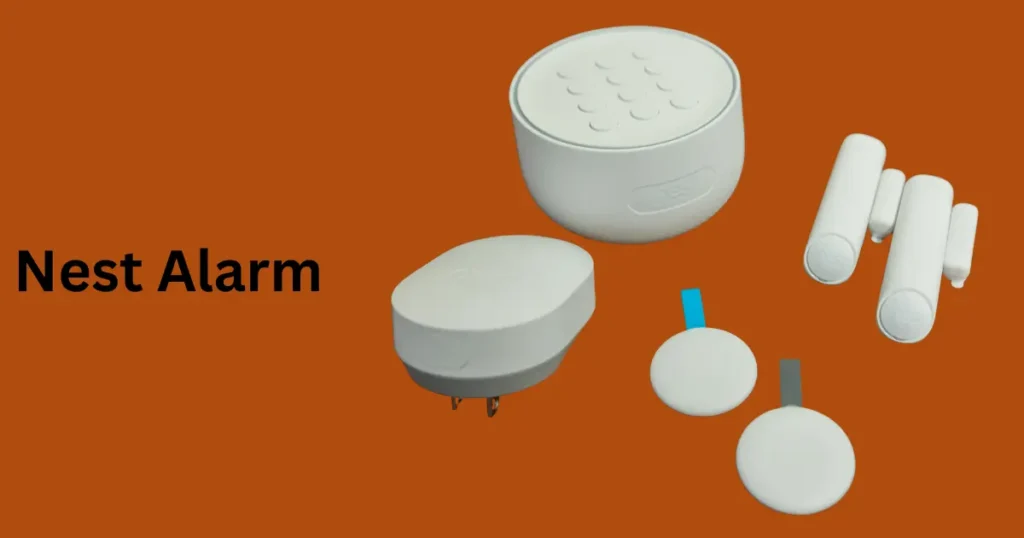
The Nest Alarm is a comprehensive smart home security system developed by Google. It provides a combination of smart devices, including a central hub (Nest Guard), Nest Detect motion sensors, Nest indoor cameras, and mobile app controls for Nest alarm monitoring services.
The system is designed for DIY installation, supporting door and window sensors, geofencing, and even two-way audio capabilities.
Whether you’re considering a starter pack or a complete smart home integration, understanding the Google Nest alarm system’s features and limitations is essential.
Types of Nest Alarm Components
- Nest Detect – Door/window contact sensors and motion detectors.
- Nest Tag – Key-fob for arming/disarming.
- Nest Temperature Sensor – Monitors ambient temperature for HVAC control.
- Nest Protect – Smart smoke and carbon monoxide alarm, tightly integrated.
- Nest Indoor Cameras – Video security adding visual coverage.
- Cellular Backup Module – Ensures connectivity if Wi‑Fi fails.
These form modular types of Nest Alarm systems—DIY or professionally monitored packages.
History of Nest Alarm
Google introduced the Nest Secure starter pack in 2017, aiming to simplify home security with user-friendly devices. However, in 2020, Google announced the Nest alarm discontinued, focusing on improving the broader Google Nest security system and smart home integrations. Existing users can still use and monitor their systems through the Nest alarm app and subscribe to services like Nest Aware.
Difference between Nest Smoke Alarm and Nest Alarm
The “Nest Smoke Alarm” (specifically, Nest Protect) and “Nest Alarm” (referring to Nest Secure) are distinct components of the Google Nest home security and safety ecosystem. Nest Protect is a smart smoke and carbon monoxide detector, while Nest Secure is security system that includes a hub, sensors, and key fobs.
Here’s a breakdown of the key differences:
Nest Protect (Smoke Alarm):
- Function: Primarily a smoke and carbon monoxide detector that provides early warnings, voice alerts, and app notifications about potential fire and carbon monoxide hazards.
- Features:
- Split-Spectrum Sensor: Detects both fast-burning and smoldering fires.
- Heads-Up Feature: Issues verbal warnings (e.g., “Heads-Up, there’s smoke in the kitchen”) before sounding a full alarm.
- App Alerts: Sends notifications to your phone when smoke or carbon monoxide is detected, or when batteries are low.
- Nightly Promise: Tests the device’s sensors and speaker each night to ensure they are working.
- Carbon Monoxide Detection: Detects the presence of carbon monoxide, a colorless, odorless, and potentially deadly gas.
- Goal: To protect your home from fire and carbon monoxide poisoning by providing early warnings and information.
Nest Secure (Alarm System):
- Function: A security system that includes a central hub (Nest Guard), door/window sensors (Nest Detect), and keychain fobs for arming and disarming.
- Features:
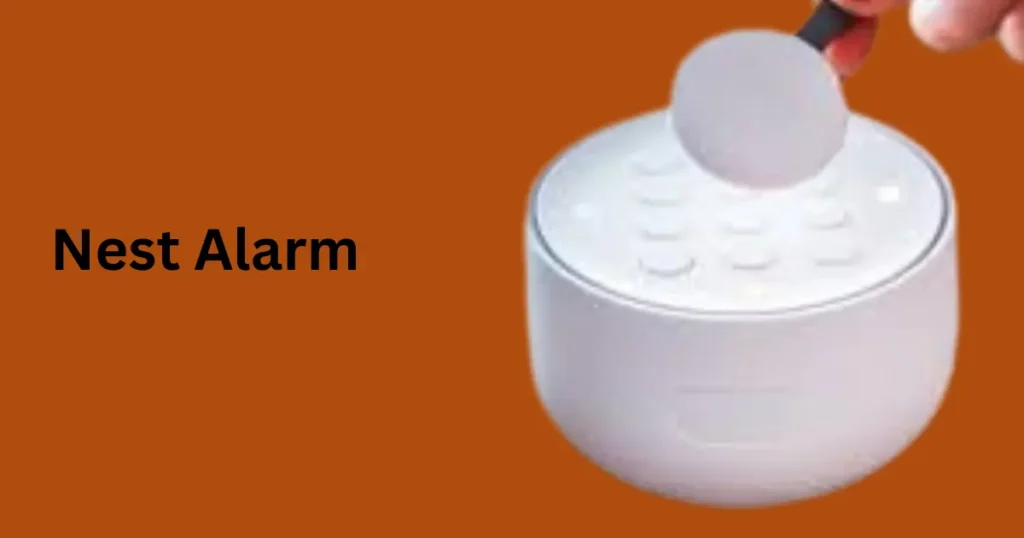
- Arm/Disarm: Allows you to arm and disarm the system via the Nest app, Nest Tag, or keypad.
- Open Quietly: Provides the option to open a door without triggering the alarm.
- Motion Detection: Nest Detect sensors can detect motion near doors and windows.
- Alerts: Sends notifications to your phone when doors are opened, windows are opened, or motion is detected.
- Goal: To protect your home from intrusion and unauthorized access.
In essence:
- Nest Protect is focused on detecting and alerting you to potential fire and carbon monoxide dangers.
- Nest Secure is focused on detecting and alerting you to unauthorized entry into your home.
They can be used independently or
Features of Nest Alarm
| Feature | Details |
|---|---|
| Nest Guard Alarm Hub | Acts as the central control keypad & siren |
| Nest Detect Sensors | Detect motion and open/close events |
| Nest Alarm Battery Backup | Keeps the system running during power cuts |
| Geofencing | Auto-arms/disarms based on your location |
| Nest Alarm App Notifications | Real-time alerts on your smartphone |
| Two-Way Audio | Speak and listen through the Nest app |
| Pet-Friendly Sensors | Reduce false alarms from pets |
| Cellular Backup | Optional add-on for internet outage security |
| Nest Secure Professional Monitoring | Available in select regions |
Working Mechanism of Nest Alarm
- Arming Modes: “Home,” “Away,” or “Off”, triggered via keypad, app, Tag, or geofencing.
- Detection: Nest Detect sensors trigger alerts when doors/windows open or motion is detected.
- Alerting: Nest Guard siren sounds locally; push notifications and app alerts are sent.
- Integration: Works with Google Home for automation, and includes two-way audio via cameras.
- Monitoring: Optional professional monitoring service can contact emergency responders.
- Backup & Reliability:
- Battery backup keeps Nest Guard active during power outages.
- Optional cellular backup maintains monitoring if Wi-Fi/internet goes down.
International Laws Governing Nest Alarm
- United States:
- UL certifications: Guard (UL 1023), Detect (UL 634/639) Google HelpBest Buy
- UL 2610 for alarm systems; UL 681 for central-station monitoring Wikipedia
- Europe:
- Products like Nest Protect comply with EN 54 fire detection standards Imo Rules
- Upcoming EU Cyber Resilience Act (CRA) mandates IoT cybersecurity standards, including secure updates, encryption, and incident reports; effective from late 2027 Wikipedia.
- ETSI EN 303 645 sets baseline cybersecurity requirements for consumer IoT scc-ccn.ca
- Canada:
- Alarm installations must follow CAN/ULC-S302 and S301 standards scc-ccn.ca.
- Global data privacy:
- Complying with GDPR and international privacy laws, as Nest transfers data cross-border and uses secure handling protocols Google Help
Temperature Chart: Operating & Storage Conditions
| Device / Range | Operating Temp | Storage Temp | Notes |
|---|---|---|---|
| Nest Protect (smoke/CO alarm) | 40 °F to 100 °F (4 °C to 38 °C) | –4 °F to 113 °F (–20 °C to 45 °C) Best Buy | Install only within operating range |
| Nest Cam / Indoor Cameras | 32 °F to 104 °F (0 °C to 40 °C) | –4 °F to 113 °F (–20 °C to 45 °C) | Outdoor cams rated for same |
| Nest Temperature Sensor | 32 °F to 104 °F (0 °C to 40 °C) | –4 °F to 140 °F (–20 °C to 60 °C) | Not part of alarm siren system |
| Nest Guard / Detect | Similar environmental ratings (not published, assumed room temp) | — | Must stay indoor and on AC power |
Material Used to Make Nest Alarm
The Nest Alarm and its components are built using high-quality materials for durability and aesthetic appeal:
- Nest Guard (Hub):
- Casing: Polycarbonate (PC) and Acrylonitrile Butadiene Styrene (ABS) plastic – flame-retardant and impact-resistant.
- Keypad: Silicone rubber for tactile feedback.
- Electronics: PCB boards with surface-mounted components and a built-in piezoelectric siren.
- Nest Detect Sensors:
- Housing: UV-resistant ABS plastic for long-lasting performance.
- Magnets: Neodymium magnets in door/window sensors for precise triggering.
- Nest Tags:
- Material: Durable ABS plastic, waterproof design (IP54 rated).
- Nest Protect (if integrated):
- Casing: Polycarbonate shell with stainless steel mesh for smoke/CO detection chamber.
These materials ensure the devices can handle daily wear and tear and maintain their modern, minimal design.
Where to Install Nest Alarm
To maximize security, strategic placement of components is essential:
1. Nest Guard (Hub):
- Near your home’s main entrance (accessible for keypad use).
- Place on a stable surface or mount to a wall away from direct sunlight and heat sources.
2. Nest Detect Sensors:
- On main entry doors and ground-floor windows.
- Place at least 6 feet above the floor to optimize motion detection and minimize false triggers from pets.
3. Nest Protect (if installed):
- On ceilings, at least 10 feet away from cooking appliances to reduce false alarms.
- Install in every bedroom, hallway, and on each floor.
4. Cameras (if integrated):
- Cover main entry points and high-traffic areas.
Requirements of Nest Alarm
To set up and run Nest Alarm effectively:
- Wi-Fi Connectivity:
- Minimum 2 Mbps upload/download speed.
- 2.4 GHz or 5 GHz network compatibility.
- Google Account: Required for Nest app and Google Home integration.
- Power Source:
- Nest Guard requires AC power (with built-in battery backup).
- Sensors operate on lithium batteries (~2-year life).
- Smartphone/Tablet: iOS (12.0+) or Android (6.0+) for app control.
- Cellular Backup (Optional):
- Requires Google’s cellular module subscription in supported regions.
Limitations of Nest Alarm
| Limitation | Details |
|---|---|
| Discontinued for New Buyers | Google stopped sales in 2020; existing systems still work. |
| No Alexa Support | Only compatible with Google Home ecosystem. |
| Limited Professional Monitoring Regions | Available in select countries only. |
| No Outdoor Motion Sensors | All motion sensors are for indoor use. |
| Dependent on Wi-Fi | Cellular backup optional; without it, outages disrupt connectivity. |
| Temperature Range | Best performance indoors (40 °F–100 °F). |
Installation Guide for Nest Alarm
Installing Nest Alarm is a DIY-friendly process. Here’s how:
Step 1: Set Up Nest Guard
- Place near main entry.
- Connect to power and Wi-Fi.
- Use the Nest app to register the device.
Step 2: Install Nest Detect Sensors
- Mount door/window sensors using provided adhesive strips or screws.
- Test placement with app prompts to avoid dead zones.
Step 3: Set Up Nest Tags
- Add Tags via the app for easy arming/disarming.
Step 4: Test the System
- Perform a test from the app to ensure all components communicate properly.
Quick Guide to Install Nest Alarm
| Step | Action |
|---|---|
| Unbox Components | Verify all items: Guard, Detect, Tags, power adapters. |
| Download Nest App | Create/login to your Google account. |
| Power On Nest Guard | Plug in, follow app instructions to connect Wi-Fi. |
| Place Detect Sensors | Install on doors/windows as advised by app. |
| Configure Tags | Pair key fobs for quick arming/disarming. |
| Integrate with Google Home | Add to Google Home app for voice control. |
| Run Full System Test | Confirm all components respond correctly. |
Nest Alarm Subscription and Costs
| Plan | Monthly Fee | Features |
|---|---|---|
| Free Tier | $0 | App control, basic alerts |
| Nest Aware Subscription | $6 – $12/month | Video history, intelligent alerts, sound detection |
| Nest Secure Professional Monitoring | $19/month | 24/7 monitoring and dispatch services |
The Nest alarm cost starts around $399 for the Nest Secure starter pack, with additional charges for accessories like Nest Protect alarm, Nest indoor cameras, and cellular backup.
Nest Alarm Compatibility and Smart Home Integration
- Works with Google Home for voice commands.
- Compatible with Nest Protect smoke detector, Google Nest smoke alarm, and smart smoke detectors.
- Supports smart smoke and carbon monoxide detectors for full home automation.
- Integration with door and window sensors, motion detectors for Nest, and other smart home security systems.
Nest Alarm vs Ring Alarm
| Feature | Nest Alarm | Ring Alarm |
|---|---|---|
| App Integration | Google Home | Alexa |
| Subscription Model | Nest Aware | Ring Protect |
| Cellular Backup | Optional | Standard in higher tiers |
| Professional Monitoring | Yes | Yes |
| Price | Higher | More Affordable |
Nest Alarm Troubleshooting
Common issues and fixes:
- Nest alarm keypad unresponsive – Check Wi-Fi or reset the device.
- Nest alarm app not sending notifications – Re-enable permissions in phone settings.
- Nest alarm siren not working – Test the siren through the app or check battery backup.
- Geofencing Nest Secure not arming – Ensure location services are enabled.
For persistent problems, use the Nest alarm setup guide or contact support.
Pros and Cons of Nest Alarm
| Pros | Cons |
|---|---|
| Easy DIY installation | Nest alarm discontinued for new buyers |
| Sleek design with Nest Guard panic button | Higher Nest alarm monthly fee |
| Advanced geofencing and app notifications | Limited third-party compatibility |
| Nest alarm warranty for peace of mind | No longer available for purchase |
Global Adoption of Smart Smoke Detectors
- Market size & growth
- Regional share (2023)
- North America: ~38 % of market revenue, dominating global adoption DataIntelo
- Europe: ~30 %, with strong regulatory backing Reddit
- Asia-Pacific: ~20 % and the fastest‑growing region due to urbanization and rising incomes Reddit
- Latin America and Middle East & Africa: ~6 % each Market Research Future
- Residential vs Commercial use
- Residential installations accounted for ~50 % of global market in 2023, while commercial applications made up ~35 % DataIntelo. Commercial segments are growing faster as safety regulations tighten
- Drivers & trends
- Major growth factors include rising fear of house fires, increased consumer awareness, emergence of AI/IoT-driven detectors, and stricter building codes GlobeNew.
- Over 62 % of users now prefer smart smoke detectors equipped with dual-sensor or wifi connectivity Reddit
- Photoelectric technology remains the most prevalent (45 % market share), while combination (photo + ionization) sensors are the fastest-growing type Verified Market Reports
Best Settings for Google Nest Alarm
- Alarm volume & tone: On Nest Hub/Display, swipe up → Settings > Volume to adjust alarm levels separate from general media Reddit
- Alarm tone: On touchscreen models, swipe up → Alarms > Settings > Alarm tone to choose preferred sound Yahoo.
- Routines & media: For Google Home speakers, use the Home app to create routines with media alarms—like Spotify—since custom tones aren’t directly supported Lifewire
Nest Alarm vs ADT – Which Is Better?
- ADT: Offers professional 24/7 monitoring, long-term care, landline/cellular backup, and strong warranty—but typically has upfront and installation costs Yahoo+15Security.org
- Nest: A sleek DIY option, integrates well with Google ecosystem, no long-term contract, but Nest Secure is discontinued (support ended April 2024), cameras still supported via ADT partnership Google Support+15SafeHome.org
- Verdict: If you want hands-off, always-monitored protection, go with ADT. If you’re tech-savvy and prefer DIY with smart integration, Nest (cameras) can work—just skip Nest Secure alarm system.
Can Nest Alarm Be Integrated with Alexa?
- Nest Basic devices (cameras, thermostats): Yes—with Alexa skills, you can control them, get live camera feeds, etc. .
- Nest Secure alarm (Guard/Detect devices): No direct support—stand-alone, doesn’t integrate with Alexa for arming/disarming YouTube+15Android Central
Does Nest Alarm Work with Existing Security Systems?
- Nest Secure uses proprietary protocols (Thread/Weave), not standard Z-Wave or Zigbee, so it cannot integrate with other systems Android Central.
How to Reset Nest Secure Alarm
- Disarm the system.
- On Nest Guard, press and hold the “2” button until it prompts for reset Tom’s GuideYouTube
- Confirm and wait for factory reset.
Does Nest Alarm Call Police Automatically?
- Without monitoring plan: No—it won’t contact authorities automatically SafeWise+4Best Buy
- With professional monitoring (e.g., Nest Secure when available): Operators can call police in emergencies Security.org.
Nest Alarm Review for Large Homes
- Cost: Base kit suitable for small homes; running Detect sensors and cameras across large homes can get expensive quickly alarms.org
- Coverage: Works well within ecosystem but scaling adds complexity and cost. Many users recommend SimpliSafe or ADT for larger setups.
Nest Alarm (Secure) Discontinued Alternatives
- ADT Self-Setup: Google-endorsed replacement; supports Nest cameras and Home integration Asurion.
- Abode: Works well with Nest Protect, offers similar DIY flexibility techhive.com.
- SimpliSafe: Frequently recommended by experts as a solid alternative .
How to Connect Nest Alarm to Google Home
- Cameras, doorbells, thermostats: Automatically show up in Google Home when linked via Home app. Guards and Detect aren’t supported anymore because Secure is discontinued.
- Nest Protect notifications and control moved to Google Home app (public preview/fully rolled out in early 2025 in the U.S.) googlenestcommunity.com
Nest Alarm with Outdoor Cameras Setup
- Nest Cams integrate seamlessly with Nest Guard system.
- For new users, pairing Nest cameras with alternative alarm systems (like ADT) offers 24/7 monitoring and Open/Close sensor support Security.org
Nest Alarm Monthly Subscription Explained
- Nest Secure monitoring: optional professional service via Brinks/Moni, includes cellular backup and emergency dispatch. Cancel anytime. With plan, police can be automatically dispatched stuff.tv+1Security.org+1.
- Camera subscription (Nest Aware): enables event history, familiar face detection, and emergency calling (E911) thesun.co.uk.
Nest Alarm vs Ring vs SimpliSafe Comparison
| Feature | Nest Secure (discontinued) | Ring | SimpliSafe |
|---|---|---|---|
| Installation | DIY, sleek aesthetic | DIY, Alexa-centric | DIY, modular |
| Monitoring | Optional, via partner services | Optional professional | Professional/self-monitoring |
| Smart integration | Deep into Google ecosystem | Strong Alexa support | Broad compatibility |
| Cost | Premium; components get pricey | Affordable kits + cams | Scalable, mid-price point |
| Support | Discontinued for Secure | Active ecosystem | Active support |
- Ring: Best suited for Alexa users; good value.
- SimpliSafe: Balanced, no contract, modular.
- Nest: Visually appealing and fully Google-integrated—but Secure is no longer sold or supported.
TL;DR
- Nest Secure alarm is discontinued (April 2024); resetting, integration, etc. only applies to existing owners.
- ADT Self‑Setup and Abode are top replacements. SimpliSafe and Ring are strong alternatives.
- Integration with Alexa works for cameras/thermostats, but not for Nest alarm components.
- Professional monitoring enables automatic calls to police; self-monitored setups require manual response.
FAQs about Nest Alarm
Is the Nest Alarm still available?
No, Google has discontinued Nest Secure, but existing users can still operate and monitor their systems.
What is included in the Nest Secure starter pack?
It includes the Nest Guard hub, two Nest Detect sensors, and two Nest Tags for keyless arming/disarming.
Does Nest Alarm require a subscription?
No, basic features work without a subscription, but Nest Aware offers enhanced monitoring and alerts.
Can I install Nest Alarm myself?
Yes, it supports DIY installation, though professional setup is optional.
Does the Nest Alarm have battery backup?
Yes, it provides up to 12 hours of battery backup during power outages.
Is the Nest Alarm compatible with Alexa?
No, it works with Google Home but not with Amazon Alexa.
Does Nest Alarm offer professional monitoring?
Yes, through Nest Secure professional monitoring in select areas.
Are Nest Alarm sensors pet-friendly?
Yes, Nest Detect motion detection is designed to minimize false alarms from pets.
What happens if Wi-Fi goes down?
The system continues operating locally, and optional cellular backup can maintain connectivity.
How does Nest Alarm compare to other smart smoke detectors?
It integrates well with Nest Protect, Google Nest smoke detector, and other smart smoke and CO detectors for a comprehensive solution.
Summary
The global smart smoke detector market is booming—with North America leading in adoption, but Asia-Pacific rapidly catching up. Growth is fueled by smart home integration, AI-powered accuracy, and tighter safety regulations across residential and commercial spaces. Consumers now favor detectors that offer remote alerts, two‑way communication, and compatibility with ecosystems like Google Nest Protect, reinforcing global demand.
Conclusion
The Nest Alarm offered a highly intuitive and feature-rich smart home security system. While the product is now discontinued, existing users continue to benefit from its seamless integration with Nest Protect, Nest indoor cameras, and Google Nest smoke alarms. For those considering alternatives, Ring Alarm and other smart smoke detectors are worth exploring.
The Nest ecosystem still leads in innovation, making it ideal for homeowners seeking a unified smart smoke and carbon monoxide detector solution within a secure smart home framework.
Please Write Your Comments