Nest Installation: Complete Guide for Americans – 2025
Updated: 2-Sep-2025
332
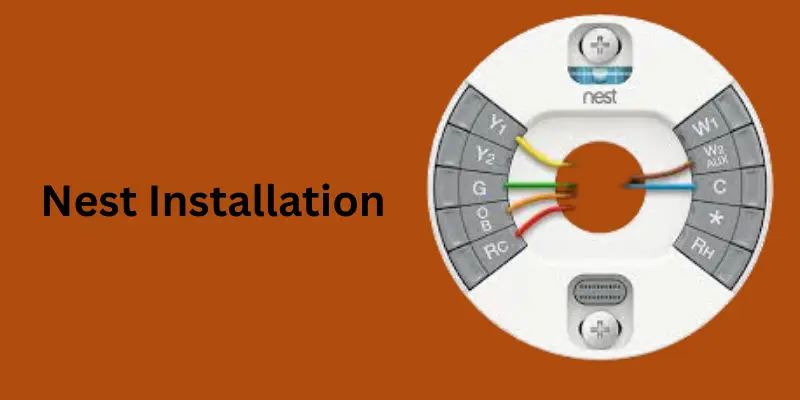
Smart thermostats have changed the way Americans control their home comfort and energy bills. Among the leaders in this space, the Google Nest Thermostat and the Nest Learning Thermostat stand out as the most popular choices. If you’re wondering about Nest installation, whether DIY or professional, this article will walk you through every step—from compatibility checks and Thermostat Wiring Diagram to cost, troubleshooting, and setup tips.
With over 40% of American households adopting smart thermostats, learning how to properly install and use a Nest device is not just about convenience—it’s about energy savings, rebates, and future-proofing your home.
What is Nest?
Nest is a brand of smart home devices created by Nest Labs (later acquired by Google). The most popular products under the Nest name are:
- Nest Thermostat – a smart thermostat that learns your schedule and helps save energy.
- Nest Doorbell – a video doorbell that lets you see and talk to visitors from your phone.
- Nest Cameras – indoor and outdoor security cameras.
- Nest Protect – a smart smoke and carbon monoxide detector.
In short, Nest = Google’s line of smart home products designed to make homes safer, more energy-efficient, and more convenient.
What is Nest Installation?
Nest installation means the process of setting up and connecting Nest devices in your home. Depending on the product, installation can involve:
- Nest Thermostat Installation
- Removing your old thermostat.
- Connecting the thermostat wires to the Nest base.
- Mounting the Nest thermostat on the wall.
- Configuring it through the Google Home app.
- Nest Doorbell Installation
- Connecting it to an existing doorbell transformer (usually 16–24V).
- Mounting the device at your front door.
- Setting it up in the app for live video and alerts.
- Nest Camera / Nest Protect Installation
- Mounting the device in the right location.
- Connecting it to Wi-Fi.
- Setting it up through the app for monitoring and notifications.
So, in simple words:
Nest installation = the process of setting up, wiring (if required), mounting, and connecting Nest devices so they work properly in your smart home system.
When, Where, Why, and Who started Nest
see further detail regarding Nest
When Was Nest Started?
- Nest Labs was founded in 2010.
- Its first product (Nest Learning Thermostat) was launched in October 2011.
Where Was Nest Started?
- Nest Labs was founded in Palo Alto, California, USA.
- The company later grew rapidly in Silicon Valley before being acquired by Google.
Why Was Nest Started?
Nest was created with the vision of making everyday home devices smarter, energy-efficient, and user-friendly.
Key reasons why Nest was started:
- Traditional thermostats were inefficient and hard to use.
- Many people wasted energy (and money) on heating/cooling when not needed.
- Homes needed smarter, connected devices that could be controlled via smartphones.
- The founders wanted to design products that were not only functional but also beautiful and intuitive.
In short: Nest was started to reinvent household devices with smart technology to improve comfort, security, and energy savings.
Who Started Nest?
- Tony Fadell (known as the “father of the iPod”) and Matt Rogers (former Apple engineer) co-founded Nest Labs in 2010.
- Both were ex-Apple engineers who wanted to bring Apple-like simplicity and smart design to home devices.
Later, in 2014, Google acquired Nest Labs for $3.2 billion, making it a major part of its smart home ecosystem.
What Nest Installation Includes
Nest installation covers all steps required to set up and integrate Nest smart home devices into your home system. It typically includes:
- Device Selection – Choosing the right Nest device (thermostat, doorbell, camera, Protect, etc.).
- Compatibility Check – Ensuring your HVAC, wiring, transformer, or existing setup supports Nest.
- Power Off & Safety Prep – Turning off power before installation for safety.
- Uninstalling Old Device – Removing your old thermostat, doorbell, or detector.
- Wiring & Mounting – Connecting wires correctly and fixing the device securely.
- Connecting to Wi-Fi – Linking the device to your home network.
- Google Home App Setup – Adding the device and configuring features.
- System Testing – Making sure heating/cooling, video, or alerts work properly.
- Calibration & Personalization – Adjusting schedules, temperature, alerts, and zones.
- Smart Integration – Linking with other Google Home or smart devices (lights, locks, etc.).
Importance of Nest Installation
Installing Nest devices properly is important because:
- Ensures energy savings – Correct thermostat setup can cut utility bills.
- Provides home security – Cameras and doorbells protect against intruders.
- Enhances safety – Nest Protect alerts for smoke & carbon monoxide.
- Boosts convenience – Remote control via smartphone.
- Improves comfort – Smart thermostats keep rooms at the right temperature.
- Supports automation – Works with other smart home devices.
- Increases property value – Smart homes attract modern buyers.
- Avoids damage – Proper wiring prevents HVAC/electrical issues.
- Peace of mind – Instant alerts on your phone when something happens.
- Eco-friendly living – Reduces unnecessary energy waste.
Pros and Cons of Nest Installation
| Pros | Cons |
|---|---|
| 1. Saves energy and lowers electricity bills with smart learning. | 1. Higher upfront cost compared to traditional devices. |
| 2. Easy remote control via Google Home app or smartphone. | 2. Requires stable Wi-Fi for proper functioning. |
| 3. Enhances home security with cameras and doorbells. | 3. Some installations need professional help (extra cost). |
| 4. Increases comfort with automatic temperature adjustments. | 4. May not be compatible with all HVAC systems or wiring setups. |
| 5. Provides real-time alerts for safety (fire, CO, intrusion). | 5. Privacy concerns since cameras and data are cloud-connected. |
| 6. Integrates seamlessly with other Google/Smart Home devices. | 6. App and features may require updates and technical know-how. |
| 7. Future-proof technology with regular Google updates. | 7. Limited features if internet or power outage occurs. |
| 8. Increases property value with modern smart home upgrades. | 8. Potential learning curve for non-tech-savvy users. |
| 9. Eco-friendly choice supporting energy conservation. | 9. Some devices (e.g., doorbell) need specific transformers (16–24V). |
| 10. Reduces false alarms with intelligent detection (Nest Protect). | 10. Ongoing subscription fees for advanced camera storage features. |
What is a Nest Thermostat?
The Nest Thermostat is a smart thermostat designed by Google to help homeowners optimize heating and cooling systems. It offers features such as learning your schedule, remote control via the Nest app, voice integration, and energy-saving Eco Mode.
Two main models are widely used in the U.S.:
- Google Nest Thermostat (budget-friendly, simple to install)
- Nest Learning Thermostat (premium model with advanced automation and self-learning features)
Both models require proper installation to unlock their full potential.
Why Choose Google Nest?
The Google Nest Thermostat and Nest Learning Thermostat are designed for energy savings, comfort, and convenience. Americans especially love them for:
- Energy efficiency: Studies show that Nest thermostats save 10–15% on heating and cooling costs annually.
- Smart learning: The Google Nest Learning Thermostat programs itself based on your habits.
- Remote control: Control your heating and cooling from anywhere through the Google Home app.
- Integration: Works seamlessly with other Google Nest devices, such as doorbells and security cameras.
Compatibility Check Before Nest Installation
Before you begin, check if your HVAC system is compatible. Google provides a Nest compatibility checker, but here are key points Americans should know:
- Works with most 24V heating and cooling systems
- Compatible with gas, electric, oil, and forced air furnaces
- Supports heat pumps (with O/B wire)
- May require a C-wire (common wire) for consistent power
Tip: If your system doesn’t have a C-wire, you may need a Nest Power Connector or professional help.
Nest Thermostat Installation (Step by Step)
Further detail is here
Tools You’ll Need
- Screwdriver
- Level tool (built into Nest plate)
- Smartphone with the Google Home app
- Internet connection
- Pencil
- Optional: wire labels
Step 1: Turn Off Power
Before handling wires, always shut off the power at your breaker panel to avoid shocks.
Step 2: Remove Old Thermostat
- Take a picture of your old thermostat’s wiring.
- Label wires according to the Nest app’s instructions.
Step 3: Check Compatibility
Use the official Google Nest compatibility checker. Most U.S. HVAC systems are compatible, but homes without a C wire may need an adapter.
Step 4: Wire Your Nest Thermostat
This is where Nest wiring diagrams matter. Typical U.S. systems use these colors and terminals:
- R (Red): Power (24V)
- W (White): Heat
- Y (Yellow): Cooling
- G (Green): Fan
- C (Blue/Black): Common wire (sometimes missing)
If you don’t have a C wire, Nest often works without it, but some systems require an adapter.
Step 5: Mount and Connect
- Attach the Nest base plate using the screws provided.
- Connect each labeled wire into its terminal.
- Snap the Google Nest Thermostat onto the base.
Step 6: Power Up and Set Up
- Restore power at the breaker.
- Follow the guided setup on the Nest device screen.
- Open the Google Home app and scan the QR code on your thermostat.
Step 7: Learn and Optimize
The Nest Learning Thermostat automatically adjusts after a few days of monitoring your patterns. You can also program schedules manually.
Tools Needed for DIY Nest Installation
To install a Nest thermostat, you’ll need:
- Screwdriver (included in the box)
- Drill (if mounting holes don’t align)
- Smartphone with the Google Home app
- Nest thermostat manual (handy for reference)
Step-by-Step Guide to Nest Installation
- Turn off power to your HVAC system at the breaker.
- Remove old thermostat cover and take a picture of the wiring for reference.
- Label wires according to their terminal connections.
- Install the Nest base plate using the provided screws.
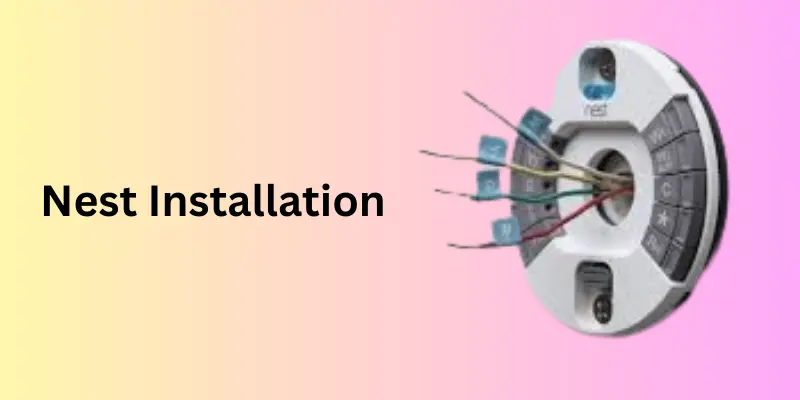
- Connect wires according to the Nest wiring diagram.
- Attach the Nest thermostat display to the base.
- Restore power and follow the on-screen setup.
- Connect to Wi-Fi and configure via the Google Home app.
Nest Wiring Diagram Explained
Understanding the Nest wiring diagram helps ensure a smooth installation. Typical American setups include:
- R wire – Power (red)
- Y wire – Cooling (yellow)
- W wire – Heating (white)
- G wire – Fan (green)
- C wire – Common (blue, if present)
- O/B wire – Heat pump reversing valve
If your old thermostat has uncommon wires (e.g., AUX, E, or X), refer to the Nest thermostat manual or Google’s support center.
Setting Up the Nest App
After physical installation:
- Download the Google Home app (or Nest app for older devices).
- Add a new device and select Google Nest Thermostat.
- Follow guided steps for Wi-Fi setup, room naming, and preferences.
- Enable remote control, scheduling, and energy reports.
Smart Features of the Nest Thermostat
Nest goes beyond just temperature control. Popular features in the U.S. include:
- Auto-Schedule – Learns your patterns and adjusts automatically.
- Eco Mode – Saves energy when you’re away.
- Home/Away Assist – Uses phone location sensors.
- Nest Leaf – Indicates energy-efficient choices.
- Integration with Alexa & Google Assistant – Voice commands for ultimate convenience.
Nest Doorbell Installation (Wired vs Battery)
See break down
Wired Nest Doorbell Installation
- Requires 16–24V transformer (standard in American homes).
- Shut off breaker, connect to existing doorbell wiring, and mount with included screws.
- Verify chime compatibility.
Battery Nest Doorbell Installation
- Mount anywhere using screws or adhesive mount.
- Charges via USB cable.
- Ideal for apartments or homes without existing wiring.
Nest Camera Installation (Indoor, Outdoor, Floodlight)
Indoor Cameras
- Plug into outlet.
- Mount on shelf, wall, or ceiling.
Outdoor Cameras
- Weatherproof design.
- Mount above entryways for wide-angle view.
- Use screws/anchors to secure.
Nest Cam with Floodlight
- Requires wired installation.
- Best for driveways or backyards.
Tip for Americans: Mount cameras at 7–9 feet for best field of view.
Troubleshooting Common Installation Issues
Some Americans run into problems after Nest installation:
- No power to thermostat → May need a C-wire or Nest Power Connector.
- Incorrect wiring → Double-check with the Nest wiring diagram.
- Wi-Fi won’t connect → Restart router or thermostat.
- System short-cycling → Check HVAC compatibility.
Tip: Always keep the Nest thermostat manual nearby when troubleshooting.
Cost to Install Nest Thermostat in the U.S.
Many Americans ask: What is the Nest thermostat installation cost?
Here’s a breakdown:
| Installation Type | Average Cost | Notes |
|---|---|---|
| DIY (Self-install) | $0 | Just your time and tools. Takes 20–30 minutes. |
| Professional (Nest Pro installer) | $100–$250 | Labor charges vary by state. |
| With C wire adapter install | $150–$300 | Extra parts/labor required. |
- Nest thermostat install cost is usually under $200 if you hire a certified Nest Pro.
- Bundled Google Nest installation (thermostat + doorbell + cameras) may cost $300–$600 depending on complexity.
- Rebates: Many U.S. utility companies offer rebates ($50–$200) when you install a smart thermostat.
Recommendation: If you’re comfortable with wiring, DIY is safe and easy. For older HVAC systems, hiring a pro is worth the extra Nest Pro installer cost.
Google Nest vs. Nest Learning Thermostat: Which to Choose?
| Feature | Google Nest Thermostat | Nest Learning Thermostat |
|---|---|---|
| Price | ~$129 | ~$249 |
| Installation | Easy DIY | Slightly more advanced |
| Learning Schedule | Manual | Automatic self-learning |
| Design | Plastic housing | Premium stainless steel |
| Energy Reports | Basic | Advanced |
Recommendation: If you want affordability, go with the Google Nest Thermostat. If you want automation and premium design, choose the Nest Learning Thermostat.
Energy Savings and Rebates
The U.S. Department of Energy estimates that smart thermostats save 10–12% on heating and 15% on cooling bills. Over time, Nest can pay for itself in under two years.
In many American states, utility companies (like PG&E, Duke Energy, and Con Edison) offer rebates and discounts for Nest thermostat installation. Always check your local energy provider.
Maintenance, Firmware Updates, and Lifespan
Nest thermostats are low-maintenance devices, but Americans should:
- Keep firmware updated via Wi-Fi.
- Clean the thermostat screen with a microfiber cloth.
- Replace HVAC filters regularly.
- Expect a Nest lifespan of 5–10 years.
Nest Thermostat Manual and Usage
Every thermostat comes with a Nest thermostat manual, but Americans often prefer quick answers online. Here’s a summary:
- Turn the ring to navigate menus.
- Press the ring to select options.
- Use the Google Home app to set schedules, check usage reports, and integrate with Google Assistant.
For deeper help, Google provides PDF manuals online for each model.
How to Use Nest Thermostat Effectively
- Set schedules for work hours vs. home hours.
- Use Eco Mode when away.
- Link Nest with Google Home routines (e.g., “Goodnight” lowers temperature).
- Review monthly energy reports for adjustments.
Future of Smart Thermostat Technology in the U.S.
Nest installation is just the beginning. Future features will include:
- AI-driven predictive comfort control
- Integration with EV chargers and solar panels
- Enhanced rebate tracking for homeowners
Which Nest Thermostat Does Matter for Wiring?
- Explain how to identify whether it’s a Nest Thermostat (2020 model), Nest Learning Thermostat, or Nest Thermostat E.
- Mention that wiring compatibility and instructions can vary slightly between models.
- Include keywords: which Nest thermostat do I have, Nest thermostat model differences, Nest wiring compatibility.
Nest Works with Heat Pump or Multi-Stage HVAC System?
- Explain support for heat pumps, dual-fuel, and multi-stage heating/cooling.
- Mention Nest compatibility checker tool from Google.
- Keywords: Nest heat pump compatibility, Nest multi-stage HVAC wiring, does Nest work with heat pump.
Nest Doorbell Transformer Requirements (US Standard 16–24V)
- A mini-section covering the popular Nest Doorbell installation question.
- Clarify that most US homes use a 16–24V transformer, which is required for Nest Doorbell wired.
- Keywords: Nest doorbell transformer, Nest doorbell 16–24V transformer US, what transformer do I need for Nest doorbell.
Nest Thermostat Wiring: R, Rc, and Rh Jumper Explained (US Homes)
Below is the further detail of Thermostat Wiring.
- Explain difference between R (power), Rc (cooling power), Rh (heating power).
- Explain when a jumper wire is needed or not with Nest.
- Keywords: Nest thermostat R Rc Rh jumper, Nest R wire vs Rc wire, Rc Rh Nest wiring explained.
- Troubleshooting Common Nest Installation Problems
- C-wire missing and solutions (Nest Power Connector).
- Nest not powering on.
- Wi-Fi not connecting after installation.
- Keywords: Nest thermostat not turning on, Nest thermostat C wire missing, Nest installation problems.
Professional vs DIY Nest Installation Cost Breakdown
- Add real U.S. average cost ranges:
- DIY: $0 (just time).
- Pro Nest installer: $99–$250 depending on HVAC complexity.
- Extra wiring: +$50–$150.
- Keywords: Nest installation cost, Nest thermostat install cost, Nest pro installer cost USA.
- Nest Learning Thermostat vs Nest Thermostat (2020) – Which Should You Install?
- Comparison table between models (price, wiring compatibility, features).
- Keywords: Nest Learning Thermostat vs Nest Thermostat, best Nest thermostat 2025.
FAQs on Nest Installation
Q1: How long does it take to install a Nest thermostat?
Most Americans can complete it in 20–30 minutes.
Q2: Do I need a C-wire for Nest installation?
Not always. Many systems work without one, but for stability, a C-wire or Nest Power Connector may be required.
Q3: Can I install a Nest thermostat myself?
Yes, if you’re comfortable with basic wiring. Otherwise, hire a Nest Pro installer.
Q4: What’s the average Nest thermostat installation cost in the U.S.?
DIY = $0, Professional = $100–$250, Device + Install = $250–$500.
Q5: What’s the difference between Google Nest Thermostat and Nest Learning Thermostat?
The Learning version is premium with self-learning schedules; the standard Google Nest Thermostat is more affordable.
Q6: How do I reset my Nest thermostat?
Go to Settings > Reset > All Settings on the thermostat.
Q7: Can Nest work with Alexa?
Yes, both Alexa and Google Assistant are supported.
Summary
Installing a Google Nest thermostat or other Nest devices is one of the smartest home upgrades Americans can make. The process is straightforward, especially with the help of Nest wiring diagrams, the Google Home app, and clear step-by-step instructions. Whether you’re doing it yourself or hiring a Nest Pro installer, you’ll enjoy lower energy bills, better security, and seamless integration with your smart home.
Conclusion
Installing a Nest thermostat is one of the smartest investments American homeowners can make in 2025. Whether you choose the budget-friendly Google Nest Thermostat or the advanced Nest Learning Thermostat, proper installation ensures maximum comfort, energy savings, and convenience.
From DIY wiring and setup to professional installation and rebates, this guide has covered every aspect of Nest installation. With rising energy costs, now is the perfect time for Americans to make the switch.
Please Write Your Comments