Honeywell Thermostat Models: A Comprehensive Guide
Updated: 31-Oct-2025
87
If you’re exploring thermostat upgrades, you’ll want to get familiar with Honeywell thermostat models—the broad range from basic non-programmable to advanced smart WiFi units. This article dives deep into the full spectrum: features, types, installation considerations, compatibility, and how to choose.
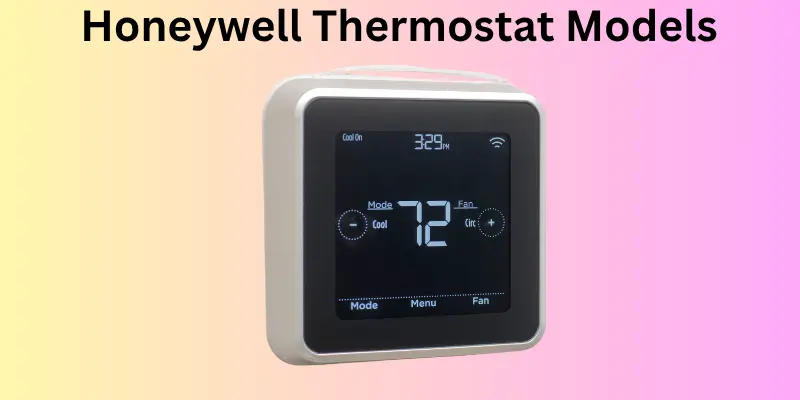
Thermostats are no longer just the dial on the wall. Today’s HVAC control devices link to apps, support voice assistants, monitor energy usage and adapt intelligently. Among the major brands, Honeywell has earned a strong reputation for reliability, longevity and innovation. According to the Honeywell Home website, Honeywell thermostats portfolio includes “simple non-programmable units to advanced smart thermostats, delivering reliable performance you can count on.” Honeywell Home
A Brief History and Inventor Origins
The company behind the Honeywell brand, Honeywell International Inc., has been an established name in thermostats and climate control for decades. One of its most notable historic models, the Honeywell T87 round thermostat, was first manufactured in 1953 and designed by engineering concept from Carl Kronmiller and industrial designer Henry Dreyfuss. Wikipedia
Over time, the line evolved from purely mechanical thermostats (dial-type) to digital, then into programmable models, and now into WiFi/smart thermostats integrated with home automation systems. The history underscores how thermostat technology has steadily advanced and how Honeywell has kept pace with innovation.
Comparison Table: Model Types of Honeywell Thermostats
| Model Type | Description | Typical Uses | Key Benefits |
|---|---|---|---|
| Non-Programmable | Basic manual control; dial or fixed digital display | Simple heating / cooling systems; low budget | Very easy to use, minimal setup |
| Programmable (5-2, 7-day) | Allows schedule programming by day and time | Homes with predictable occupancy | Helps reduce energy use by scheduling |
| WiFi / Smart Thermostat | Connects to Internet; remote control via app; voice assistant support | Smart homes, multi-zone, complex HVAC systems | Flexibility, remote access, energy monitoring |
According to Honeywell’s site: “Choose from… non-programmable thermostat for simple, reliable control; programmable thermostat that let you customise schedules; Smart and WiFi Thermostats that connect to your smartphone or voice assistant for remote control.
Key Honeywell Thermostat Models & Features
While Honeywell has many model numbers, here are some representative ones and what to look for.
- Basic non-programmable: e.g., older TH3110D1008 model recommended as a simple reliable choice.
- Programmable models: A 7-day programmable unit such as the RTH6580WF is cited.
- Smart/WiFi models: The RTH8580WF WiFi thermostat is flagged as budget-smart model in a 2025 roundup. Tom’s Guide
- Latest: The Honeywell Home X2S Smart Thermostat (Matter-compatible) introduced in 2025 for about $79.99. The Verge
Features to check:
- Wiring compatibility (does your system have a “C-wire” / common wire?). Honeywell states WiFi units often require a C-wire or include an adapter.
- HVAC system compatibility: single stage vs multi-stage; heat pump vs conventional.
- Scheduling flexibility: 5/2 day vs 7-day.
- Smart features: remote app control, voice assistant, geofencing, energy reports.
- Display and user interface: tactile buttons vs touchscreen vs full colour smart display.
- Additional sensors/support: room sensors, zone support, under-floor heating compatibility.
How the Thermostat Works & Materials/Components
Working Mechanism:
A thermostat like those in the Honeywell line monitors ambient temperature via an internal sensor and compares it to the “setpoint” you’ve defined. When there is a difference (too cold or too hot), it triggers the HVAC system (heating or cooling) to engage until the setpoint is reached.
With more advanced models, the process includes:
- Scheduling logic (you define times / days to automatically change setpoints)
- Remote control (via WiFi, smartphone app)
- Smart adaptation (learning your habits or using occupancy/geo-fencing)
- Integration with voice assistants and other smart home platforms
Materials & Build:
Typical thermostats include:
- A mounting base with wires/terminals (R, C, W, Y, G, etc)
- A circuit board with microcontroller, sensors (temperature, humidity sometimes)
- Interface (buttons, knobs, display panel)
- Housing (typically plastic with insulation to avoid self-heating)
- For WiFi/smart models: WiFi module, perhaps Bluetooth, power adapter if no C-wire
Honeywell markets itself as: “easy to install and easy to use” for DIY installers as well as pros.
Importance of Choosing the Right Honeywell Thermostat Model
Selecting the correct Honeywell thermostat model is crucial because:
- Energy efficiency: A programmable or smart model can reduce HVAC runtime and save on energy bills.
- Comfort & convenience: Remote control, scheduling and smart adaptation improve comfort and lifestyle.
- System compatibility: Installing the wrong type (e.g., non-programmable on a multi-stage heat pump) can lead to poor performance or HVAC damage.
- Future-proofing: Smart thermostats support integrations and may maintain value longer. For example, the new Honeywell X2S offers Matter compatibility for smart home ecosystems.
- Installation ease: Picking a model suited to your wiring and HVAC system avoids costly electrician callbacks.
Usage Over Time: Past, Present & Future
Past:
Thermostats were simple dials or switches; Honeywell’s T87 from 1953 is a classic example.
Programming was basic or non-existent; users manually adjusted temperature.
Present:
The trend is toward programmable and WiFi units. Honeywell’s current product range includes non-programmable, programmable and smart WiFi models.
Smart home integration is now common; remote access and voice assistant compatibility are expected. Features like geofencing (know when you leave/return) are emerging. (Honeywell’s Lyric series used geofencing years ago).
Future:
Expect further integration with IoT, home automation ecosystems (Matter, Apple HomeKit, Google Home), predictive climate control (machine-learning), improved indoor-air-quality sensors, and more granular zoning control (room-by-room). As Honeywell’s X2S shows, even budget models are getting “smart” feature sets.
Pros and Cons of Honeywell Thermostat Models
Pros:
- Wide variety: from very basic to advanced smart models — Honeywell offers something for every need.
- Strong brand and long history — trusted reliability.
- Many models support energy-saving scheduling and remote control.
- Compatible with many HVAC systems (single-stage, multi-stage, heat pump) if you choose the correct model.
- Smart models can link to other smart home devices, giving automation benefits.
Cons:
- Some WiFi/smart models require a “C-wire” (common wire) which may not exist in older homes — might require additional wiring.
- Basic non-programmable models lack scheduling and smart features — less efficient.
- Smart models cost more upfront (though they often pay back via energy savings).
- If you pick a model without full compatibility (e.g., trying to use a single-stage thermostat on a multi-stage heat pump), you may experience poor performance.
- Some consumers may under-utilize schedule features (as studies show many programmable users don’t set schedules properly).
How to Choose the Right Honeywell Thermostat Model
Here are key factors and a quick checklist:
- HVAC system compatibility
- Does your system use a single-stage heat/cool, two-stage, or a heat pump?
- Check for “C-wire” presence: if none, you may need a model that has an adapter or uses battery only.
- If you use zoned systems or under-floor heating, you’ll need models designed for that.
- Functionality you need
- Do you want simple manual control only? Then a non-programmable unit suffices.
- Do you want scheduled temperature changes (weekday/weekend)? Then a 5/2 or 7-day programmable model.
- Want remote control, smartphone app, voice assistant, smart home integration? Choose a WiFi/smart model.
- Budget vs value
- Basic models cost less but have fewer features.
- Smart models cost more but may yield energy savings and convenience.
- Smart home & future-proofing
- If you have or plan smart home devices (Alexa, Google Home, Matter), pick a model with those integrations.
- Newer smart models include geofencing, learning schedules, sensors, and more.
- Installation & wiring
- DIY vs professional install: some are very easy to install, others may require modifying wiring.
- Always turn off power before swapping thermostat units.
- Features & interface
- Look for intuitive display, ease of programming, support for remote sensors if needed.
- Check whether the model supports filter change reminders, HVAC system diagnostic warnings, energy reports.
Detailed list of Honeywell thermostat models with numbers
Here’s a breakdown of each:
1. Honeywell Home RTH9585WF WiFi Smart Color 7‑Day Programmable Thermostat
- Model number: RTH9585WF1004 (often just RTH9585WF)
- Key specs:
- WiFi enabled (2.4GHz)
- Full-colour touchscreen display
- 7-day programming capability
- Supports up to 3 heat / 2 cool conventional systems or 2 heat / 2 cool heat pumps (depending variant)
- ENERGY STAR certified
- Wiring / compatibility requirements:
- Requires a common (C-wire) for WiFi power in most installations (as with many WiFi thermostats)
- Works with many forced-air systems (gas/oil/electric) and heat pump systems — check specific wiring diagram on model label.
- Typical U.S. price: Approximately US $179.99 (at one vendor) with a list higher ($229.99) before discount.
2. Honeywell Home RTH6580WF WiFi 7‑Day Programmable Thermostat
- Model number: RTH6580WF Amazon
- Key specs:
- WiFi enabled (2.4GHz)
- Backlit digital display; 7-day programmable schedule
- Supports voice assistants (Alexa, Google) via app integration
- ENERGY STAR certified
- Wiring / compatibility requirements:
- Requires a C-wire (common) in typical installations.
- Doesn’t support electric baseboard heat (120-240V) unless special variant.
- Typical U.S. price: Varies ~US $120-160 (depending retailer/promotions)
- Notes: Very good mid-tier smart WiFi thermostat option. Less premium display than the RTH9585WF but strong value.
3. Honeywell Home RTH111B Digital Non‑Programmable Thermostat
- Model number: RTH111B (often RTH111B1042 / similar suffix)
- Key specs:
- Digital non-programmable: simple setpoint, no advanced scheduling
- Suitable for basic heating/cooling systems (single stage).
- Wiring / compatibility requirements:
- Standard 24VAC thermostat wiring (R, W, may include Y/G depending system)
- Does not require WiFi or smart home connectivity, thus no C-wire requirement beyond standard control wiring.
- Typical U.S. price: ~US $30-40 (depending retailer)
- Notes: Ideal budget choice if you just need a basic thermostat without programmability or WiFi.
4. Honeywell Home RTH221B 5‑2 Day Programmable Thermostat
- Model number: RTH221B (5/2 day programmable)
- Key specs:
- 5-2 day programming: one schedule for weekdays + one for weekend
- Digital display, buttons for setting time/temperature setpoints.
- Wiring / compatibility requirements:
- Standard low-voltage 24VAC system wiring. No WiFi connectivity in base model.
- Typical U.S. price: ~US $45-60 (depending retailer)
- Notes: Good mid-budget choice for homeowners wanting scheduling (but not full smart features).
5. Honeywell Home RTH6500WF WiFi Programmable Thermostat
- Model number: RTH6500WF (or closely related series) Wink
- Key specs:
- WiFi enabled programmable thermostat.
- Works with forced-air, heat pumps with backup.
- Wiring / compatibility requirements:
- Requires C wiring for WiFi power.
- Typical U.S. price: ~US $100-140
- Notes: In earlier-generation WiFi smart thermostat category; good value for WiFi scheduling without premium display.
6. Honeywell Home X2S Smart Thermostat (Matter Compatible)
- Model number: X2S Smart Thermostat (Honeywell Home)
- Key specs:
- Entry-level smart thermostat from Honeywell/Home with support for Matter smart home standard.
- Price announced ~US $79.99.
- Claims up to ~22% heating savings, ~17% cooling savings under recommended settings.
- Wiring / compatibility requirements:
- Requires a C-wire. Supports up to 2 heating / 2 cooling stages conventional; up to 2 heating / 1 cooling stage for heat pump systems.
- Typical U.S. price: ~US $80 (launch price)
- Notes: Excellent value smart thermostat and future-proofing (Matter). If compatible with your wiring, great choice for value smart upgrade.
7. Honeywell Home CT410B Line‑Voltage Non‑Programmable Thermostat
- Model number: CT410B1017/E1 (one variant)
- Key specs:
- Line-voltage thermostat (120V-277V) for electric baseboard heaters / line-voltage systems.
- Non-programmable.
- Wiring / compatibility requirements:
- Requires electrician familiar with high‐voltage wiring. Rated for 120-277 V line voltage; not for low-voltage 24 V systems.
- Typical U.S. price: ~US $20-30
- Notes: Ideal for homes or areas with electric baseboard heating rather than central HVAC forced-air systems.
8. Honeywell Home Basic Non‑Programmable Thermostat Series
- Model number: Various – generic “Basic Non-Programmable” models listed under Honeywell’s portfolio.
- Key specs:
- Simple temperature control only, no scheduling, no WiFi.
- Suitable for basic systems, simpler wiring.
- Wiring / compatibility requirements:
- Standard 24VAC wiring for low-voltage systems, or line‐voltage variant if applicable.
- Typical U.S. price: ~US $20-40
- Notes: Best for users who only need straightforward heating/cooling control and minimal features.
Summary Table
| Model | Tier | WiFi/Smart | Programming | Wiring Highlights | Typical Price |
|---|---|---|---|---|---|
| RTH9585WF | Premium Smart | Yes | 7-day | Needs C-wire; supports up to 3H/2C conventional | ~$180 |
| RTH6580WF | Mid Smart | Yes | 7-day | Needs C-wire; not for line-voltage baseboard | ~$120-160 |
| RTH111B | Entry Non-Programmable | No | None | Standard 24 V low-voltage wiring | ~$30-40 |
| RTH221B | Budget Programmable | No | 5-2 day | Standard low-voltage wiring | ~$45-60 |
| RTH6500WF | WiFi Programmable | Yes | 7-day | Needs C-wire; earlier generation WiFi | ~$100-140 |
| X2S Smart | Value Smart (Matter) | Yes | Smart schedule | Needs C-wire; future-proof smart home | ~$80 |
| CT410B | Line-Voltage Non-Prog | No | None | 120-277 V line voltage wiring | ~$20-30 |
| Basic Non-Prog Series | Very Budget | No | None | Standard wiring variants | ~$20-40 |
Important Compatibility and Wiring Notes
- Always check whether your existing wiring includes a C-wire (common). Many WiFi/smart thermostats require one for continuous power. (See RTH6580WF product listing).
- If your system is a line-voltage system (electric baseboard heaters, 120/240 V) you cannot use a standard low-voltage thermostat (24 V). Use a line-voltage rated model (e.g., CT410B).
- Identify your HVAC system type: single-stage vs multi-stage; heat pump vs conventional. Some thermostats support multiple stages, others only single-stage.
- If you want scheduling (5-2, 7-day) or remote access (WiFi) vs just manual control, choose accordingly.
- Smart thermostat features (geofencing, smart home integration, Matter compatibility) add value but also wiring & setup complexity.
- Pricing shown is approximate U.S. retail at time of reference; actual pricing may vary by retailer, promotions, shipping or region.
Frequently Asked Questions (FAQs)
Q1: Does a Honeywell WiFi thermostat require a C-wire?
Yes, many Honeywell WiFi/smart thermostats require a common wire (C-wire) to supply continuous power. Some models may include a power adapter if a C-wire is not present.
Q2: What’s the difference between a 5-2 day and a 7-day programmable model?
A 5-2 day model lets you set one schedule for weekdays (5 days) and one for the weekend (2 days). A 7-day model allows a completely separate schedule each day of the week.
Q3: Are smart thermostats worth it?
Yes — they offer remote control, scheduling flexibility, potential energy savings, integration with smart home systems, and improved comfort. However, benefits depend on correct installation and usage.
Q4: How much energy can I save by upgrading?
While actual savings vary, industry commentary indicates that smart thermostats can reduce heating/cooling costs substantially by optimizing runtime and reducing waste. (For example, the X2S model lists up to ~22% heating savings, 17% cooling savings in some scenarios).
Q5: Can I install a Honeywell thermostat myself?
Yes — many Honeywell models are designed for DIY install, especially if your wiring is standard and you have existing wires for R, W, Y, G, C. If wiring is non-standard or you lack a C-wire, hiring a pro might be wise. Honeywell provides support documentation.
Q6: What is Matter compatibility and does Honeywell support it?
“Matter” is a smart home standard that enables devices from different ecosystems to work together. Honeywell’s newer X2S Smart Thermostat supports Matter, making it more interoperable with multiple smart home platforms.
Q7: Will a Honeywell thermostat work with my older HVAC system?
Depends on your wiring and system type. If your system is basic (single-stage heat/cool) and you have common wires, most Honeywell models will work. If your system is complex (multi-stage, variable capacity, zoned, under-floor heating), you’ll need to select a compatible model — check the Honeywell model’s specifications.
Q8: Do I need WiFi/smart features?
If you value app control, voice commands, energy reports or use remote access (e.g., vacation property), then yes. If you prefer simple manual control and don’t need remote features, a non-programmable or basic programmable model may suffice.
Q9: How long do these thermostats last?
Typical lifespan is around 10-15 years (or more) depending on quality of build, installation, and how often features are updated/demanded. Choosing a well-built brand like Honeywell helps.
Q10: Are there rebates or utility programs for upgrading to a smart thermostat?
Yes — many utility companies offer rebates for installing smart thermostats as part of energy-efficiency programs. Check local utility incentives. Honeywell’s website mentions “Thermostat Rebates”.
Summary
The range of Honeywell thermostat models spans from simple non-programmable units to fully-featured smart WiFi devices, providing solutions for varying budgets, system types, and user needs. Key takeaways include:
- Non-programmable models offer basic temperature control with minimal setup and cost.
- Programmable models allow scheduled control (e.g., 5-2 day or 7-day programs) to improve comfort and energy efficiency.
- WiFi/Smart models provide remote control, connectivity (smartphones, voice assistants), learning features, and compatibility with modern HVAC systems.
- Compatibility (wiring such as C-wire, system type, line-voltage vs low-voltage) is crucial when selecting the right model.
Conclusion
Choosing the right Honeywell thermostat model means aligning your HVAC system requirements, wiring infrastructure, and desired features (manual control, scheduling, or full smart home integration). The broad Honeywell portfolio ensures there is a fit for: simple manual control needs, mid-range scheduling control, and advanced smart home connected systems. By matching your system to the correct tier—non-programmable, programmable, or smart—you’ll maximize comfort, efficiency and value.
Please Write Your Comments