Nest Thermostat Battery: Charging, Replacement and Troubleshooting Guide
Updated: 8-Sep-2025
300
The Nest Thermostat is one of the most popular smart thermostats in the United States, known for energy savings, modern design, and easy integration with Google Home. But one question that American homeowners frequently ask is: “What about the Nest Thermostat battery?”
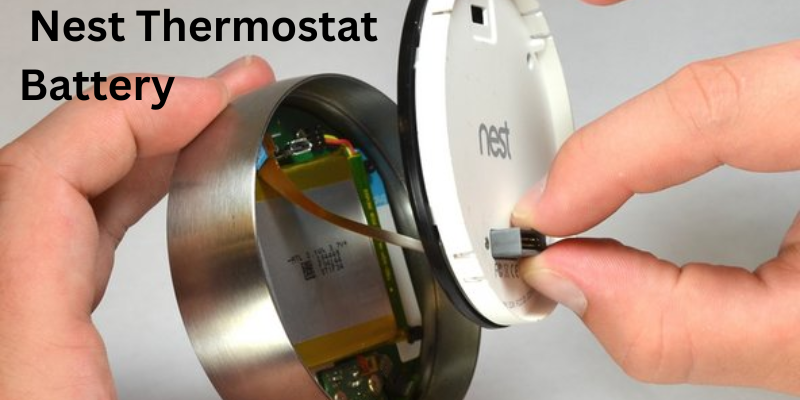
Like all electronic devices, the Nest Thermostat requires power to function. While it’s usually powered through your HVAC system’s C-wire, it also contains an internal rechargeable lithium-ion battery that acts as a backup. Understanding how the battery works, how long it lasts, how to charge it, and when to replace it is essential for keeping your thermostat running smoothly.
This article is your complete guide to the Nest Thermostat battery—we’ll cover installation, troubleshooting, charging, replacement, lifespan, and common FAQs asked by Americans.
What is the Nest Thermostat Battery
The Nest Thermostat battery is a built-in rechargeable lithium-ion battery that powers the device when the main power supply is interrupted or insufficient. It is not meant to be replaced regularly like AA or AAA batteries. Instead, it charges automatically through the thermostat’s wiring connection to your HVAC system.
- Nest Learning Thermostat & Nest Thermostat E → Rechargeable lithium-ion internal battery.
- Nest Thermostat (2020 model) → Uses 2 standard AAA alkaline batteries for backup.
This difference often confuses homeowners, but the rule of thumb is: newer models may rely more on replaceable batteries, while the classic Nest Learning models recharge themselves.
Why Does the Nest Thermostat Need a Battery
The Nest Thermostat relies on its battery for:
- Backup power – Keeps settings and connection alive during short power outages.
- Wi-Fi connectivity – Ensures smart features like remote control, scheduling, and Google Home integration remain functional.
- Display and sensor operation – Runs the screen, motion sensors, and temperature sensors.
- Energy savings reports – Stores data when HVAC power isn’t sufficient.
Without a functioning battery, your Nest may:
- Disconnect from Wi-Fi.
- Fail to control heating/cooling.
- Display a “Low Battery” or “Battery Error” warning.
Nest Thermostat Battery Life Expectancy
- Rechargeable lithium-ion battery models → Lasts 2–3 years before performance weakens.
- AAA battery models → Last about 12–24 months, depending on usage.
Signs your Nest Thermostat battery is failing:
- Frequent “low battery” messages.
- Blank screen or device won’t turn on.
- Constant Wi-Fi disconnections.
- HVAC system not responding.
How to Check Nest Thermostat Battery Level
Checking battery status is simple:
- On the thermostat, press the ring to open the Quick View menu.
- Go to Settings > Technical Info > Power.
- Look for the Battery voltage reading.
- 3.7V or higher = Healthy.
- 3.6V or lower = Low battery warning soon.
- Below 3.5V = Device may shut down.
How to Charge the Nest Thermostat Battery
If your Nest battery is low, there are two main charging methods:
1. Via HVAC C-Wire (Automatic Charging)
- The thermostat charges itself from the HVAC system.
- If your system doesn’t provide constant power, adding a C-wire or Nest Power Connector is recommended.
2. Manual Charging via USB
For Nest Learning and Nest E models:
- Remove the thermostat from the wall plate.
- Plug it into a micro-USB (Nest Thermostat E) or mini-USB (Nest Learning Thermostat) charger.
- Charge for at least 30–60 minutes.
- Reattach to the wall once it powers back up.
For the 2020 Nest Thermostat:
- Simply replace the AAA batteries with fresh alkaline ones.
Nest Thermostat Battery Replacement
For Nest Learning Thermostat & Nest Thermostat E
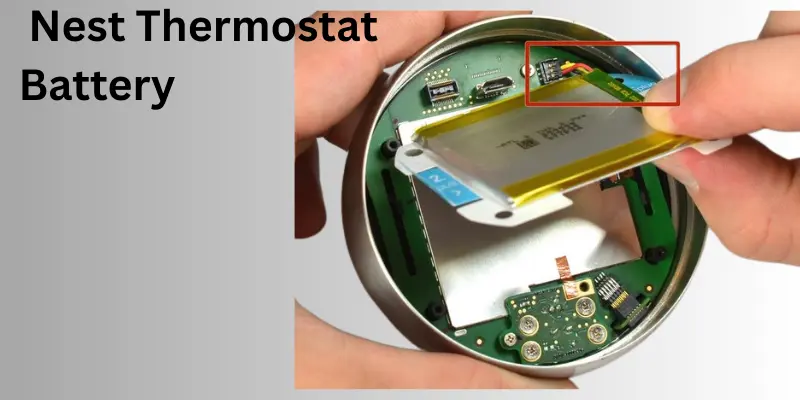
These models have non-user-replaceable lithium-ion batteries. If the battery no longer holds a charge:
- Contact Google Nest Support for repair or replacement.
- Some advanced DIYers attempt to replace it with third-party batteries, but this may void your warranty.
For Nest Thermostat (2020 model)
- Replace the two AAA alkaline batteries in the back of the unit.
- Steps:
- Pull the thermostat off its base.
- Remove the old AAA batteries.
- Insert two new alkaline batteries.
- Snap the device back onto the base.
Troubleshooting Nest Thermostat Battery Issues
1. Nest Thermostat Low Battery Warning
- Try charging manually via USB.
- Ensure your HVAC system provides continuous power.
- Check wiring, especially the C-wire.
2. Nest Thermostat Keeps Shutting Off
- Battery may not be charging correctly.
- Could indicate HVAC wiring issues.
3. Nest Thermostat Not Charging
- Check if USB charging works.
- If not, the internal battery may need replacement.
4. Nest Thermostat Low Battery No Power to R-Wire
- Common issue with older HVAC systems.
- Solution: Install a Nest Power Connector or have an electrician add a C-wire.
Nest Thermostat Models and Battery Differences
| Model | Battery Type | Replacement Needed? | Charging Method |
|---|---|---|---|
| Nest Learning Thermostat | Rechargeable lithium-ion | No (internal) | HVAC C-wire or USB |
| Nest Thermostat E | Rechargeable lithium-ion | No (internal) | HVAC C-wire or USB |
| Nest Thermostat (2020) | 2x AAA alkaline | Yes (replaceable) | Manual battery replacement |
Pros and Cons of Nest Thermostat Battery System
Pros
- Provides backup power during outages.
- Ensures smart features stay active.
- USB charging option prevents downtime.
- Long lifespan on rechargeable models.
Cons
- Rechargeable batteries eventually degrade.
- Some models require professional servicing.
- AAA batteries require regular replacement.
- Low battery can disrupt HVAC control.
Do’s and Don’ts of Nest Thermostat Battery
Do’s
- Check battery status every few months.
- Use official Nest or high-quality alkaline batteries.
- Keep HVAC wiring properly connected.
- Charge manually if you see low battery warnings.
Don’ts
- Don’t ignore repeated low battery alerts.
- Don’t use cheap or rechargeable AAA batteries in the 2020 model.
- Don’t attempt battery replacement on rechargeable models unless you’re skilled in electronics.
- Don’t leave your thermostat uncharged for long periods.
How to Maintain Your Nest Thermostat Battery
Even though the Nest Thermostat battery is designed to last for years, proper care ensures longer lifespan and fewer disruptions. Americans often overlook small maintenance steps, but these can make a big difference in preventing “low battery” errors or device shutdowns.
1. Regularly Check Battery Status
- Go to Settings > Technical Info > Power on your Nest Thermostat.
- Keep the voltage at 3.7V or higher.
- If it drops frequently below 3.6V, your battery may need charging or support from a C-wire.
2. Keep HVAC Wiring in Good Condition
- Ensure the C-wire is properly connected so the thermostat receives continuous power.
- If your system doesn’t have a C-wire, consider adding one or installing a Nest Power Connector.
- Loose wiring can cause charging problems and faster battery drain.
3. Charge the Battery During Low Warnings
- For rechargeable models (Learning & E), remove the thermostat and charge via USB cable when needed.
- For the 2020 model, replace the AAA batteries immediately when you see low battery alerts.
4. Avoid Extreme Temperatures
- Keep your thermostat installed in a location with stable indoor temperatures.
- Avoid direct sunlight, drafts, or near appliances that generate heat, as extreme conditions shorten battery life.
5. Limit Excessive Screen Wake-Ups
- Features like Farsight and frequent manual adjustments can drain more power.
- Set screen brightness to Auto instead of maximum.
- Allow the device to enter Eco mode when away to reduce energy use.
6. Use Quality Batteries (For 2020 Nest Thermostat)
- Only use high-quality alkaline AAA batteries.
- Avoid cheap brands or rechargeable AAA batteries, as they don’t provide consistent voltage.
7. Update Firmware Regularly
- Software updates often optimize power management.
- Keep your Nest connected to Wi-Fi so it receives the latest updates automatically.
8. Reboot if Battery Issues Persist
- If you notice faster drain or charging issues, try a manual restart of the thermostat.
- This often resets minor software glitches affecting battery performance.
By following these steps, you can extend the life of your Nest Thermostat battery, reduce downtime, and ensure your thermostat continues delivering comfort and energy savings without interruptions.
Types of Nest Thermostat Battery
Nest thermostats use two main types of batteries, depending on the model:
- Rechargeable Lithium-Ion Battery (Built-In)
- Found in Nest Learning Thermostat and Nest Thermostat E.
- Charges automatically from HVAC wiring (or via USB if needed).
- Not user-replaceable (Google recommends professional service if it fails).
- AAA Alkaline Batteries (Replaceable)
- Found in the Nest Thermostat (2020 model).
- Requires two AAA alkaline batteries.
- User-replaceable and simple to maintain.
Best Nest Thermostat Battery
- For Rechargeable Models (Learning & E):
- The built-in lithium-ion battery is the best option since it is designed specifically for these devices.
- If replacement is ever required (after 2–3 years), stick to Google-recommended OEM batteries rather than third-party versions to avoid warranty issues.
- For the 2020 Nest Thermostat:
- The best batteries are high-quality alkaline AAA batteries from trusted brands like Duracell or Energizer.
- Avoid rechargeable AAA batteries, as Nest recommends only alkaline for consistent voltage supply.
Comparison of Nest Thermostat Battery Types (10 Points)
| Feature | Rechargeable Lithium-Ion (Learning & E) | AAA Alkaline (2020 Model) |
|---|---|---|
| Battery Type | Built-in rechargeable lithium-ion | 2x AAA alkaline batteries |
| Replacement | Not user-replaceable | Easily replaceable |
| Lifespan | 2–3 years before degrading | 12–24 months per set |
| Charging Method | HVAC C-wire or USB cable | Replace with new batteries |
| Maintenance | Minimal, mostly automatic | Requires battery swaps |
| Cost Over Time | Lower (no frequent purchases) | Higher (buying batteries annually) |
| Convenience | No need for battery changes | Quick and DIY-friendly |
| Risk of Downtime | May require USB charging if HVAC wiring is weak | Only when batteries fully drain |
| Eco-Friendliness | Rechargeable = less waste | Disposable batteries = more waste |
| Best For | Users wanting hands-off maintenance | Users preferring easy DIY replacements |
Summary:
- If you want set-and-forget convenience, the rechargeable lithium-ion Nest Learning Thermostat battery is best.
- If you prefer easy DIY replacement without service calls, the AAA battery-powered Nest Thermostat (2020) is more practical.
Nest Thermostat Battery: Past, Present, and Future
Past
- Early Nest thermostats (Learning and E models) introduced rechargeable lithium-ion batteries, reducing the need for user intervention.
Present
- The 2020 Nest Thermostat simplified things with AAA alkaline batteries, making replacements quick for homeowners.
Future
- Likely improvements in longer-lasting lithium batteries.
- Solar-powered or energy-harvesting thermostats may emerge.
- AI-powered power management to reduce battery strain.
FAQs
1. How long does a Nest Thermostat battery last?
- Rechargeable models: 2–3 years.
- AAA battery models: 12–24 months.
2. Can I replace the Nest Thermostat battery myself?
- Yes, for the 2020 model (AAA batteries).
- No, for Learning and E models (internal rechargeable).
3. How do I charge my Nest Thermostat if the battery is low?
- Either through HVAC wiring or by plugging into a USB charger.
4. Why does my Nest Thermostat say “Low Battery”?
- It’s not receiving enough power from HVAC wiring.
- Battery may be old and losing capacity.
5. Will my Nest Thermostat stop working if the battery dies?
- Yes, it will lose connection and HVAC control until recharged.
6. How do I extend my Nest Thermostat battery life?
- Keep HVAC wiring stable, replace batteries when due, and reduce excessive screen wake-ups.
7. Is the Nest Thermostat battery covered under warranty?
- Yes, if still within Google’s warranty period.
8. How do I know if my Nest Thermostat uses AAA batteries or a rechargeable battery?
- If it’s the 2020 Nest Thermostat → AAA.
- If it’s Nest Learning or Nest E → rechargeable.
9. Can I use rechargeable AAA batteries in my Nest Thermostat (2020)?
- No, only alkaline batteries are recommended.
10. What should I do if my Nest Thermostat won’t turn on after charging?
- Try a longer USB charge.
- If still dead, contact Google support.
Summary
The Nest Thermostat battery plays a critical role in keeping your smart thermostat running efficiently. Whether you own the Nest Learning Thermostat, Nest Thermostat E, or the 2020 Nest Thermostat, understanding how the battery works, how to charge it, and when to replace it ensures you avoid disruptions in heating and cooling.
For American homeowners, the best practice is simple: monitor your Nest battery regularly, replace AAA batteries when needed, and keep your HVAC wiring in good shape. Doing so ensures that your Nest continues to deliver comfort, savings, and smart home convenience.
Conclusion
The Nest Thermostat battery may be small, but it’s essential to the reliability of your smart home comfort system. Whether you’re using a Nest Learning Thermostat with a rechargeable lithium-ion battery, a Nest Thermostat E, or the 2020 Nest Thermostat with replaceable AAA batteries, understanding how the battery works helps you avoid unexpected shutdowns and heating or cooling interruptions.
For American homeowners, the key takeaways are simple: monitor your Nest’s battery status regularly, know how to charge it via USB or HVAC power, and replace AAA batteries on time if you own the newer model. If your battery is internal and no longer holds a charge, contacting Google Nest support is the safest option.
Please Write Your Comments