Nest Thermostat E- Models E vs Learning vs 2020
Updated: 5-Sep-2025
421
Smart thermostats have transformed the way Americans manage home heating and cooling. Among the most popular brands, the Google Nest Thermostat stands out for blending technology, energy efficiency, and sleek design. Over the years, Google has released several models, including the Nest Learning Thermostat, the Nest Thermostat E, and the newer Google Nest Thermostat (2020 model). This article explains what each model offers, why the Nest Thermostat E was important, and what’s trending now in America.
Here’s TOC for your more choice
What is Google Nest Thermostat
The Google Nest Thermostat is a family of smart thermostats that let homeowners control their HVAC systems with advanced features like scheduling, energy tracking, and remote control via smartphone apps. Americans have embraced these devices for their ability to save money on utility bills and improve comfort.
- Nest Learning Thermostat (launched 2011) – Premium, adaptive smart thermostat that learns your behavior.
- Nest Thermostat E (launched 2017) – Affordable, simplified version with frosted display.
- Google Nest Thermostat (2020) – Budget-friendly option with app-based controls and modern design.
Each generation has unique features and fits different needs, but all share the core benefits of energy efficiency, smart home integration, and user-friendly design.
What is the Nest Thermostat E
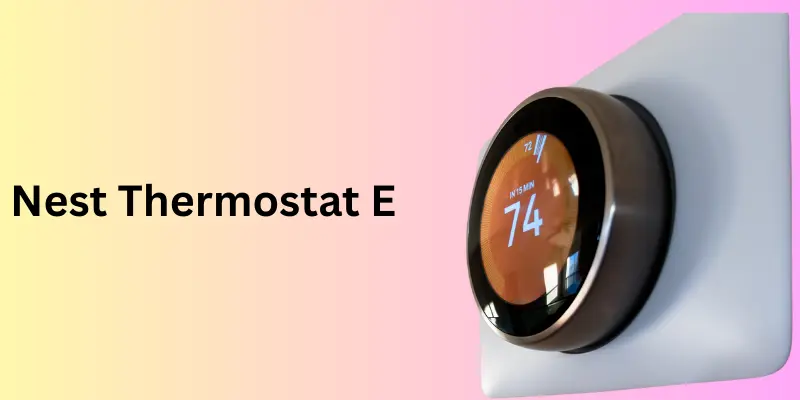
The Nest Thermostat E was released in 2017 as a lower-cost alternative to the Learning Thermostat. While it has been discontinued in the U.S., it played a crucial role in making smart thermostats accessible to more households.
Key Features of Nest Thermostat E
- Frosted polycarbonate display that blends into walls.
- Energy Star certification, proving efficiency.
- Remote control through the Nest app.
- Home/Away Assist – uses sensors and phone location to adjust settings.
- Energy tracking via the Nest Leaf icon and usage reports.
- Compatibility with most U.S. HVAC systems (about 85%).
Why It Mattered in America
- Brought down the cost barrier for smart home tech.
- Allowed millions of households to try smart energy management.
- Received praise for its minimal, discreet design.
Although it is no longer trending, the Nest Thermostat E made smart thermostats mainstream in America.
The Nest Learning Thermostat – Premium Experience
The Nest Learning Thermostat is the flagship model, often considered the gold standard for smart thermostats in America.
Features
- Learning capability – Automatically builds a schedule based on your habits.
- Premium metal finish with multiple Nest thermostat colors (copper, white, black, stainless steel).
- Large, bright display with Farsight that lights up when you walk by.
- Supports 95% of HVAC systems, including advanced multi-stage setups.
- Detailed energy history to track savings.
Generations
The Nest Learning Thermostat has gone through several Nest thermostat generations, with the latest being the 4th generation. Each generation brought improvements in design, compatibility, and intelligence.
Who It’s For
Americans who want premium design, advanced learning features, and maximum energy savings.
The Google Nest Thermostat (2020 Model)
In 2020, Google released the Google Nest Thermostat, a budget-friendly alternative designed for wide adoption.
Features
- Modern design with a mirrored display.
- Controlled through the Google Home app (instead of the Nest app).
- Energy-saving features like Eco mode and scheduling.
- Lower price point than the Learning Thermostat.
- Available in attractive colors like snow, sand, fog, and charcoal.
Who It’s For
Homeowners looking for affordability and modern smart features without premium pricing.
Current Trends in America
Today, the 2020 Google Nest Thermostat is trending more than the E model because:
- It’s actively sold in the U.S.
- Integrates seamlessly with other Google smart home devices.
- Attracts budget-conscious homeowners seeking energy efficiency.
Nest Thermostat Instructions & Manuals
Many Americans search for the Nest thermostat manual or Nest thermostat instructions when setting up their device. Google provides digital manuals, but here are the basics:
Setup Steps
- Check Nest thermostat power requirements (usually low-voltage HVAC systems, 24V).
- Verify compatibility with your system (furnace, heat pump, central AC).
- Turn off power before wiring.
- Follow color-coded wiring instructions (R, Rc, Rh, Y, W, G, C wires).
- Connect to Wi-Fi and the Google Home app.
These steps differ slightly depending on whether you have the E, Learning, or 2020 model, but the principles remain the same.
Nest Thermostat Power Requirements and Voltage
A common question: What voltage does the Nest Thermostat use?
- All Nest thermostats are designed for low-voltage HVAC systems (24V).
- They are not compatible with high-voltage systems (like baseboard heaters at 120V/240V).
- Some setups may require a C-wire to provide continuous power.
Understanding Nest thermostat power requirements is crucial before buying or installing.
Nest Thermostat Colors
A unique feature of the Nest Learning Thermostat and newer models is the availability of stylish finishes. This appeals to American homeowners who care about home design.
Options
- Nest Learning Thermostat: Stainless Steel, Black, White, Copper.
- Nest Thermostat (2020): Snow, Sand, Fog, Charcoal.
- Nest Thermostat E: White with frosted display (blends in with walls).
Colors allow customers to match thermostats with their home’s interior design.
How to Use Nest Thermostat
If you’re wondering how to use Nest Thermostat, here are the basics:
- Adjust temperature manually using the dial (Learning Thermostat) or touch strip (2020 model).
- Remote control using the Nest or Google Home app.
- Voice commands via Google Assistant or Alexa.
- Set schedules automatically (Learning) or manually (E and 2020 models).
- Energy-saving features like Eco Mode and Home/Away Assist.
Comparison Table – Nest Thermostat E vs Learning vs 2020
| Feature | Nest Thermostat E | Nest Learning Thermostat | Google Nest Thermostat (2020) |
|---|---|---|---|
| Release Year | 2017 | 2011 (latest Gen 4) | 2020 |
| Price at Launch | $169 | $249 | $129 |
| Display | Frosted polycarbonate | Premium glass & metal | Mirror finish LCD |
| Learning Capability | No | Yes | No |
| App Control | Nest app | Nest app | Google Home app |
| Energy Star Certified | Yes | Yes | Yes |
| Colors Available | White only | Stainless, Black, Copper, White | Snow, Sand, Fog, Charcoal |
| Availability in U.S. (2025) | Discontinued | Available | Available |
Pros and Cons of Each Model
Nest Thermostat E
Pros: Affordable, discreet design, easy setup.
Cons: Discontinued, limited compatibility, no premium finishes.
Nest Learning Thermostat
Pros: Learns behavior, premium look, broad compatibility.
Cons: Expensive, overkill for some users.
Google Nest Thermostat (2020)
Pros: Affordable, modern design, current support.
Cons: No auto-learning, relies on Google Home app only.
What’s Trending in America
- Nest Learning Thermostat remains the premium choice for those who want top efficiency and smart features.
- The Google Nest Thermostat (2020) is trending due to affordability and ongoing availability.
- The Nest Thermostat E is no longer trending but is remembered for opening the door to accessible smart thermostats.
Nest Thermostat E Troubleshooting
If your Nest Thermostat E isn’t working as expected, try these common fixes:
- No power / blank screen → Check circuit breaker, confirm wires are properly connected, ensure HVAC system is on. Some systems may require a C-wire for consistent power.
- Wi-Fi not connecting → Restart your router, make sure your thermostat software is updated, and reconnect through the Nest app.
- Heating or cooling not turning on → Double-check wiring against the Nest thermostat manual, and verify compatibility with your HVAC system.
- Temperature seems wrong → Calibrate by checking if the thermostat is placed away from direct sunlight, vents, or appliances that affect readings.
- App not syncing → Log out and back in, or remove and re-add the device in the Nest app.
If problems persist, reset the thermostat or consult official Nest thermostat instructions on Google’s support page.
Dos and Don’ts for Nest Thermostat E
Do’s
- Do turn off power before wiring or rewiring.
- Do check compatibility with your HVAC system before installation.
- Do update software regularly for bug fixes and new features.
- Do use the Nest app for remote control and scheduling.
- Do place it in a central, shaded location for accurate temperature readings.
Don’ts
- Don’t install on high-voltage systems (120V/240V) – the E works only with 24V low-voltage HVAC systems.
- Don’t expose it to direct sunlight, fireplaces, or drafts that can throw off readings.
- Don’t ignore wiring errors—miswiring can damage both your HVAC system and thermostat.
- Don’t rely only on manual use—take advantage of Home/Away Assist and energy-saving features.
- Don’t paint over or cover the thermostat, as it affects sensors.
Nest Thermostat E — Past, Present, and Future
1- Past — how the Nest Thermostat E came to be and why it mattered
Launch & purpose. Google Nest introduced the Nest Thermostat E in 2017 as a lower-cost, simpler alternative to the premium Nest Learning Thermostat. The E was intentionally designed to be understated — a white, frosted polycarbonate face that “blends into the wall” — and to bring smart-thermostat features to more households.
Key capabilities. At launch the E offered core smart features—remote control via the Nest app, Home/Away Assist, energy-saving tools (the Leaf and energy history), and compatibility with most 24-volt HVAC systems—while removing some premium touches (metal finish, Farsight, and some advanced wiring options). It was priced to be more accessible.
Market impact. By lowering the entry price for smart thermostats, the E helped mainstream smart climate control. Reviewers and buyers praised it as a practical, budget-friendly way to get energy savings without the premium look/price of the Learning Thermostat.
2. Present — what the Nest Thermostat E is today (availability, support, and practical state)
Still usable and supported (but check availability). Official Google product and support pages list the Nest Thermostat E’s specs and compatibility with common 24V systems; retailers (Home Depot, Amazon, Walmart) have sold the E and sometimes still list stock/refurbished units. That means many Americans can still buy new or refurbished E units from third-party sellers and use them today.
Power / wiring reality. Like other Nest models the E is designed for low-voltage (≈24V) HVAC systems and is engineered to work without a C-wire in many homes — though some installations will require a C-wire or Google’s Power Connector for stable operation. If you see power codes (E1, N260, etc.) or battery drain, Google’s support pages explain the Power Connector and C-wire troubleshooting.
Support landscape — keep an eye on device lifecycle. Google has publicly announced end-of-support plans for some older Nest thermostats (for example: the earliest Nest Learning Thermostats), with changes taking effect October 25, 2025 — a reminder that smart devices can lose cloud/app features over time. While that announcement explicitly named some older Learning Thermostats, it highlights an important reality for E owners: future support and app/cloud features depend on Google’s product lifecycle decisions. Confirm current support status on Google’s site before purchasing used/old stock.
3. Future — what to expect for the Nest Thermostat E and practical guidance for Americans
Likelihood of fading/limited future updates. The Nest Thermostat E was a generation behind Nest’s flagship and Google’s more recent push has been toward newer models (the 2020 Nest Thermostat and the Gen-4 Nest Learning Thermostat). As Google refreshes product lines and tightens support, older/entry models like the E are more likely to be phased out of active sales and receive fewer feature updates over time. That trend already shows up in Google’s device availability and support notices for legacy models.
What that means for buyers/owners.
If you already own a Nest Thermostat E: it will keep working as a thermostat even if cloud features are limited later — but remote app control, voice integration, and automatic cloud features depend on ongoing support. Back up any settings and note your serial/Google account details; watch Google’s support pages for lifecycle announcements.
If you’re buying now for a U.S. home: consider how important remote/cloud features are to you. If you want long-term app support and the newest features (Matter, more advanced energy features, remote sensors), prefer current models (Nest Thermostat 2020 or the Nest Learning Thermostat Gen-4) or other actively supported smart thermostats. If you want a low-cost, basic smart thermostat and can accept possible eventual limits to cloud features, a new/refurbished E can still be a practical buy.
Alternatives & the evolving smart-thermostat market. The smart-thermostat market is evolving — newer competitors and Matter-compatible devices are appearing, offering lower prices and improved ecosystem compatibility. If broad smart-home interoperability or futureproofing matters, evaluate Matter-capable thermostats or the latest Nest models rather than relying on older E stock.
Practical recommendations for American readers (short checklist)
If you own an E: keep it, use it — but note Google’s lifecycle policies and back up account info. If cloud/app features are mission-critical, plan for an eventual upgrade.
If you plan to buy now: prefer buying new, in-warranty units from reputable retailers (or buy the 2020 Nest / Gen-4 Learning Thermostat) for longer support. Consider buying refurbished E only if you accept potentially shorter support windows. The Home DepotGoogle Store
If you care about wiring/power: verify your home uses 24V low-voltage HVAC and check whether a C-wire or Power Connector will be required. Use Google’s compatibility checker before purchase. Google StoreGoogle Help
Watch support deadlines: monitor Google’s Nest support pages for any announcements affecting your model. Google has already announced support changes for some legacy Nest Learning Thermostats effective October 25, 2025 — and similar decisions can affect other older models later.
FAQs About Nest Thermostat E
1. Is the Nest Thermostat E still available in the U.S.?
No, it’s discontinued, but refurbished units may be found online.
2. Which Nest thermostat is best for Americans today?
The Nest Learning Thermostat (Gen 4) for premium features, or the Google Nest Thermostat (2020) for affordability.
3. Do Nest thermostats work without a C-wire?
Yes, most models can, but some HVAC systems require a C-wire for stable power.
4. What is the Nest thermostat voltage?
They work with 24V low-voltage systems, not high-voltage.
5. How many generations of Nest thermostats exist?
- Nest Learning Thermostat: Four generations.
- Nest Thermostat E: One generation (discontinued).
- Google Nest Thermostat (2020): Current budget model.
6. How do I get Nest thermostat instructions?
Google provides downloadable Nest thermostat manuals on their support site.
Summary on Nest Thermostat E
The Nest Thermostat E was Google’s smart thermostat that delivered essential features—remote control, energy savings, and a subtle frosted design—at a more affordable price point. While it has since been discontinued in America, its impact remains clear: it lowered the barrier for homeowners to adopt smart energy solutions and paved the way for today’s broader lineup of Google Nest thermostat generations.
For U.S. homeowners now, the Nest Learning Thermostat continues to serve as the premium choice, while the Google Nest Thermostat (2020 model) offers a budget-friendly, widely available alternative. The E may no longer be trending, but it played an important role in shaping the future of smart home climate control.
Conclusion
The Nest Thermostat E may no longer be sold in America, but it marked an important step in making smart thermostats affordable and mainstream. Today, American homeowners choose between the premium Nest Learning Thermostat and the budget-friendly Google Nest Thermostat (2020), depending on their needs.
Whether you’re looking for a thermostat that learns your habits, a simple app-controlled device, or a stylish design to complement your home, the Google Nest thermostat generations offer something for everyone. As smart homes continue to trend, these devices will remain central to comfort, efficiency, and energy savings in the U.S.
Please Write Your Comments